Code, Don’t Tell: Programming as an Essential Journalism Skill

(tl;dr: this started out as a short post about how all of journalism can benefit from learning to code. It is now a massive rant that maybe I’ll split up later. It covers:

This post is inspired by a recent discussion on the NICAR (National Institute of Computer Assisted Reporting) mailing list, in which a journalism professor asked how her students should position themselves for a newspaper’s web developer job. The answer I suggested was: have them learn programming and have them publish projects online, on their own, that they can later show an employer.

But I’m becoming more convinced that programming – a decent grasp of it, not make-the-next-Facebook level – is an essential skill for all journalists, even ones that never intend to produce a webpage in their career. And for students, or any aspiring journalist, I think I can make the case that programming is absolutely the most important skill to learn in school (along with honing your interviewing, research and writing skills at the school paper/radio/TV station) if you want to improve your chances for a serious journalism career.

#

Hersh and Bamford

A few years ago, I attended a panel on investigative reporting that featured Seymour Hersh – the Pulitzer Prize-winning reporter who exposed the My Lai massacre – and James Bamford, a former Navy intelligence analyst who is well-respected for writing books that managed to penetrate the workings of even the super-secret NSA (affectionately known as the No Such Agency).

Seymour Hersh

The discussion turned to the use of the Freedom of Information Act, a law that reporters wield to get sensitive, unpublished documents from the federal government. Given that the NSA isn’t known for being chatty, Bamford explained how his stories were put together through exhaustive uses of FOIA.

When an audience member asked Hersh how often he used FOIA, his response – and I’m quoting from memory here – was:

“Why the fuck would I FOIA documents?”

I can’t read Hersh’s mind, but I’m guessing that he wasn’t wholesale dismissing the importance of FOIA, which has been essential in countless investigative stories.

He probably meant that: He’s Seymour Hersh. He exposed the My Lai massacre. He’s a regular contributor for the New Yorker. The kind of stories he writes for the New Yorker involves the type of people who wouldn’t be caught dead making a statement that would ever be reprinted on a document subject to a FOIA request.

And even if they were FOIAble, those requests take time (sometimes many years) and involve countless lawyers and legal wrangling. In the meantime, he’s up to his eyeballs in secret officials who, for some reason or other, are eager to spill their secrets to him, because he’s Seymour Hersh.

So, why the fuck would he FOIA documents?

Bamford doesn’t have quite that brand power and his targets are likely more reticent. But he’s learned – possibly through his Navy days – that there are plenty of important secrets in the stacks of documents that have been deemed fit for public consumption. It’s not always obvious, even among intelligence officials, to see how a mass of innocuous information inadvertently reveals big secrets.

So, back to the subject of aspiring journalists: to them, the already-employed journalists are the Seymour Hershes. These journalists have established themselves and their beat, which they can focus full-time on because they’re earning a salary to do so. Their phone contains the cell numbers of all the important officials who won’t ignore their 9 p.m. Sunday night call. When they write something, a large number of trees, barrels of ink, and/or corporate-purchased bandwidth are readily expended to make it known.

On the other end of the spectrum, the aspiring journalists are the Bamfords. Between work shifts, they have the same right as Joe Public to attend meetings and leave inquiries with contact@yourcity.gov. But for them, even the local police department might as well be the NSA. They aren’t going to be privy to hush-hush phone calls or let past the murder scene tape.

If this is your current vantage point, even if you intend to be a Hersh-style reporter, you’re going to have to Bamford your way into a field that has an increasing amount of noise and a corresponding shrinkage in paid, established positions.

Given this situation, I can think of no better strategy than to learn programming. This is a skill that not only makes more efficient every other journalism skill (writing, researching, publishing) but can, like Bamford’s relentless FOIAs, reveal stories that non-programming journalists will never be able to do, and in an unfortunate number of cases, even conceive of.

Learning the Hard Way

Zed Shaw, who isn’t a journalist but is renowned for both his code contributions and his widely-read (and free!) how-to-program books, puts it this way:

“Programming as a profession is only moderately interesting. It can be a good job, but you could make about the same money and be happier running a fast food joint. You’re much better off using code as your secret weapon in another profession.

People who can code in the world of technology companies are a dime a dozen and get no respect. People who can code in biology, medicine, government, sociology, physics, history, and mathematics are respected and can do amazing things to advance those disciplines.

Note that he doesn’t have many romantic notions about programming as a profession. However, programming is something bigger than just a job: it’s an essential, game-changing skill.

Code, don’t tell

Show, don’t tell” is how my high school journalism teacher taught us how to write. Instead of telling the reader something:

James Smith is one of the toughest football players on the team.

show it, through observed evidence:

When the halftime whistle blew, James Smith walked to the sidelines and collapsed. He later was told that the neck pain he played with through the second quarter was caused by a fracture in his neck.

I guess “Code, don’t tell” doesn’t really make sense; it’s just my made-up-way of saying that we have fantastically more ways than ever to tell – blog posts, retweets, status updates, auto-aggregations and other forms of repurposing – but we’re little better equipped to find and develop the actual stories. Programming is a skill that cuts through the noise, allows for the analysis and reporting on new substantive information sources, and even provides a way to create innovative story-telling forms (i.e. the web developer’s role).

So to follow my high school teacher’s advice, here’s an overview of my two most successful journalism projects so far, both done at ProPublica. As I explain later, both more or less originated from me sitting on my couch, being annoyed by what I saw as a lack of transparency. The first one, SOPA Opera, was initially self-published and probably could have been done entirely from the couch. The other, Dollars for Docs, was a full out effort by my colleagues and me. But it was programming-driven at every phase.

#

SOPA Opera

I won’t rehash the debate over this now-dead Internet regulation law, but the inspiration for the SOPA Opera news app was simply: I had read plenty of debate about SOPA for months. But when I wanted to see just which legislators actually supported it and their reasons for doing so, there wasn’t yet a great resource for that.

If you know about the official legislative site, THOMAS and are familiar with its navigation, you could at least find the list of sponsors. But good luck trawling the Congressional committee sites to find transcripts and testimony related to the law. It goes without saying that a list of opponents doesn’t exist and is beyond the official scope of THOMAS anyway.

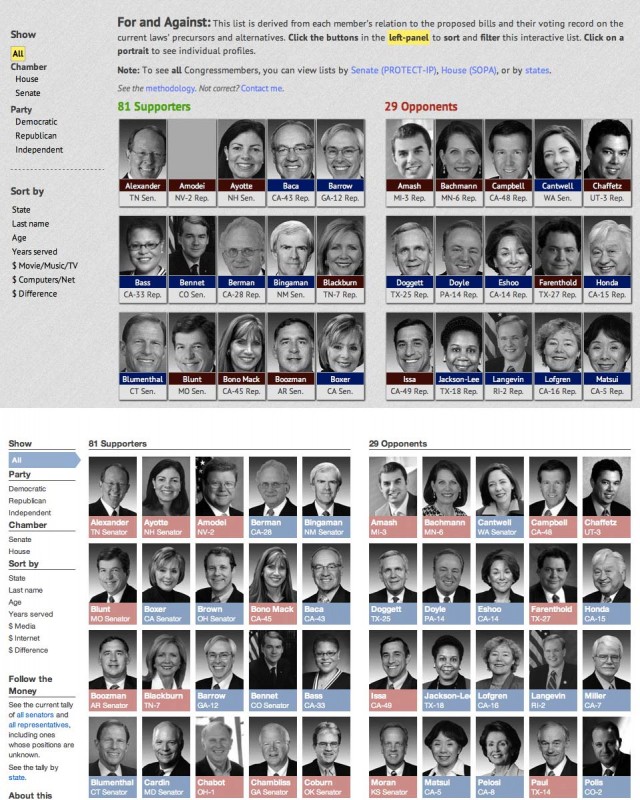
So SOPA Opera, boiled down, is an pretty pedantic concept: “Hey, here’s a list of Congressmembers and what I’ve found out so far about their positions on SOPA.

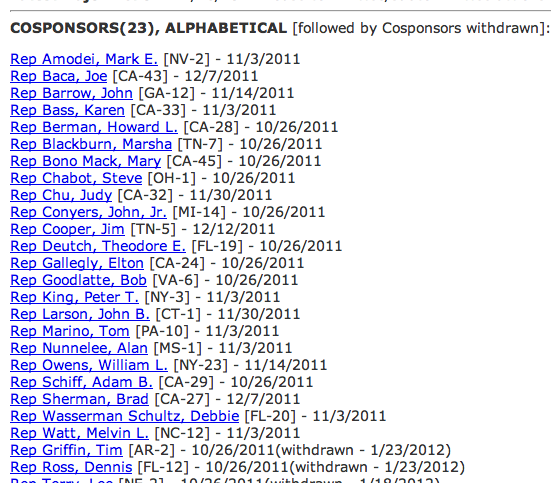
In other words, changing this:

SOPA sponsors, on THOMAS

To this:
The gist of SOPA Opera could be done without any programming whatsoever. You could even build a static in Photoshop and upload the image onto the Internet. So what role did programming play in this? It made it very easy to gather the already-available information, which included: the official list of sponsors, the boilerplate biographical and district information on every Congressmember (including their mug shots), and contribution data from the Center for Responsive Politics.

No exaggeration: a decent programmer could build a nice site from this data in about half-an-hour. The jazzy part of the site – the dynamic sorting of the list – was already built and offered as a free plugin to use (courtesy David DeSandro). It’s entirely possible to create SOPA Opera by hand, given a few days and an infinite amount of patience.

So programming allowed me to save my time and energy for the actual reporting. I thought about building a scraper to go through each Congressmember’s Facebook and Twitter page to search for the term “SOPA” But until the blackout, most lawmakers had nothing to say on the topic. So at first, my “research” largely involved typing “SOPA [some congressmember’s name]” into Google News and usually finding nothing.

When the SOPA issue blew up during the Jan. 18 blackout, I didn’t have to do any searching, as Congressmembers pretty much rushed to make known their opposition to SOPA. SOPA Opera was designed in a way to make it easy for constituents to look up their representative and, if I had no information about him/her, tell me what they found out after talking to their representative. Or, in a few cases, Congressional staffers contacted me directly.

SOPA Opera easily broke the single-day traffic record at ProPublica. This was mostly due to blackout-participating sites like Craigslist that directed their traffic to us as a reference. Clearly, what caused the seismic shift on the SOPA debate were the mega-sites that coordinated the millions of emails and phone calls to lawmakers, and SOPA Opera was an indirect beneficiary of the increased public interest.

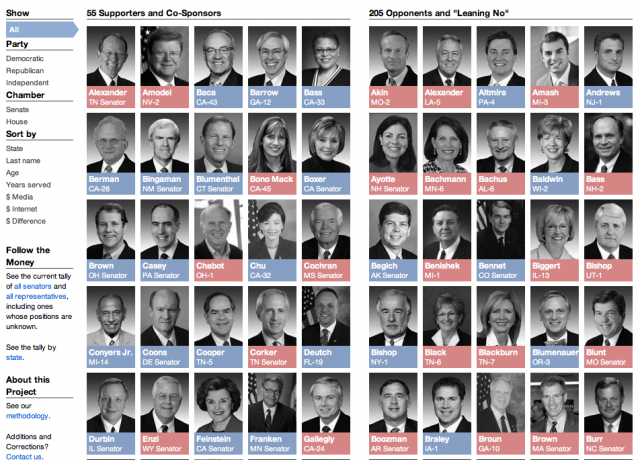
But I believe that SOPA Opera made at least one important contribution to the debate: it made very clear the level and characteristics of support enjoyed by SOPA. One thing that the THOMAS listing of sponsors fails to do is note the political parties of the lawmakers. I felt that this was a critical piece and it was easy to get and display. The result: many visitors to SOPA Opera who had believed that SOPA was a diabolical scheme by [whatever-party-they-oppose] were shocked at how SOPA’s support was so bi-partisan and broad.

I heard from a number of people who had been highly energized about the anti-SOPA debate yet were completely shocked that Sen. Al Franken – automatically assumed to be on the side of “Internet freedom” – was in fact, was a sponsor of SOPA’s counterpart in the Senate. This was no state secret: Sen. Franken has been passionate and outspoken in his support and was one of the few who didn’t back away after political support collapsed post-blackout.

SOPA Opera’s success probably owes less to my skill than to the dismal state of accessibility in our legislative process. This goes to show that even when you arrive extremely late to the game, it’s possible to make a significant impact by simply having an idea of how things can be better. This applies in just about any situation and profession. Programming just makes it much easier to push your creation forward.

Some technical details on self-publishing

I don’t want to dwell too much on the web-side of things, as that is just one specific use of programming. But to get back on the topic of how someone can position themselves for a web-related media job, SOPA Opera is a really excellent example of the potential in self-publishing.

SOPA Opera spent about a week on a domain (sopaopera.org) that I purchased for $10. It didn’t bear the ProPublica brand then, and I didn’t have time to promote it beyond a few tweets and submitting it to Hacker News and Reddit.

But in just a week, sopaopera.org had racked up about 150,000 pageviews before we migrated it to ProPublica:
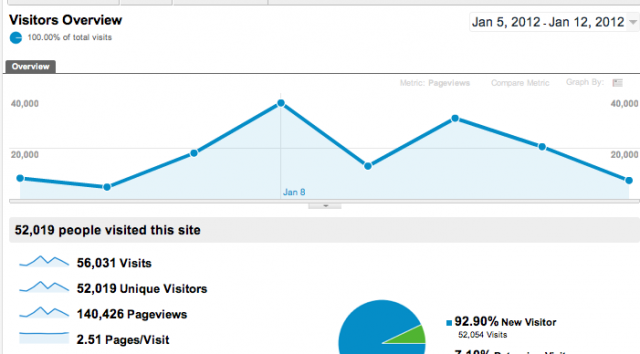
That’s not a huge number in itself, and traffic to it increased exponentially under ProPublica’s umbrella. But it had gained enough notice that prominent were linking to it. The problem I had at the start: Googling a random lawmaker’s name and the term “SOPA” and finding absolutely nothing – was solved, as Google highly-indexed all of the auto-generated lawmaker pages on SOPA Opera. At least one Congressmember’s office emailed me to update his page.

Not bad for a holiday break project and $10, using free resources and tools that are available to anyone with a computer. Back when I applied for newspaper jobs, I had to carry a portfolio of cut-out newspaper articles to show editors that at least a few people (my college paper and the one newspaper I interned at) had been willing to waste trees and ink on me. You were out of luck if all you had were a bunch of links to blog posts.

The mindset is different today, articles published on a traditional publication’s website, or at an online-only organization like Huffington Post, can count as legit clips. But I’d like to think that showing a full-blown website that includes not only traditional reporting content, but examples of how visual and interface design can tell a new story, as well as being able to provide concrete metrics (pageviews, referring links) of impact, would be even more impressive to today’s news editors.
#

Dollars for Docs

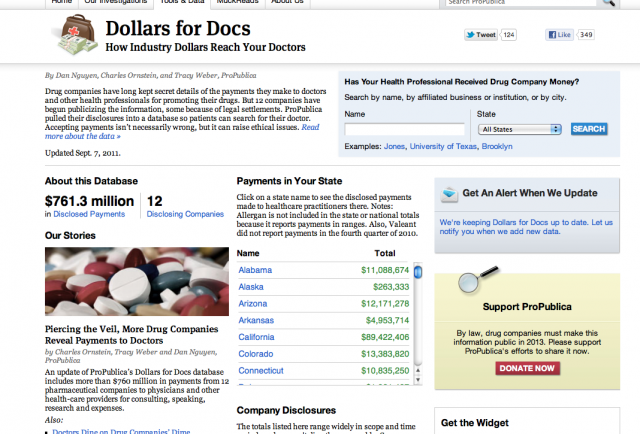
Like SOPA Opera, Dollars for Docs (aka “D4D”) is late to its respective topic. It is a long accepted practice for medical companies to pay doctors to promote their products, not much different from a notable athlete who endorses a shoe that she considers to be the best for her sport. But in recent years, lawmakers and regulators have called for more transparency of these financial ties to prevent cases in which a doctors are unduly influenced by their benefactors.

Data on company-to-doctor payments is at least two decades old: Minnesota enacted a law in 1993 requiring companies to disclose their payments. However, that “data”, which came in the form of paper records that had to be hand-entered into a computer – after, of course, you visited the records’ actual storage location and photocopied each page at 25 cents a pop. For that reason, the records were collected but unexamined for at least a decade until Dr. Joseph Ross (now at Yale University) and the Public Citizen advocacy group collected and analyzed the records.

In 2007, they published their findings in the Journal of the American Medical Association, with the conclusion that the payment records were “compromised by incomplete disclosure as well as insufficient access.”:

  • In Vermont (which enacted a public disclosure law in 2001), most disclosures were redacted for “trade secrets” reasons. Of the publicly disclosed payments, 75% of them lacked information identifying the recipient
  • In Minnesota, many of the companies had years in which they reported nothing.
  • The “public” disclosures were pretty much inaccessible to the public. Dr. Ross and Public Citizen had to go to court to get the Vermont records.

Dr. Ross told me that after his study was published, not only was it apparent that the public was in the dark, but doctors themselves had no idea that the data were even being collected. The Minnesota pharmacy board was subsequently so swamped by requests from other researchers, hospitals and litigants that it began publishing the disclosures online.

At around the same time, the New York Times published its own investigation using the Minnesota records. Their analyzed both the company disclosures and Medicaid payments to Minnesota psychiatrists and found that during a time period in which company payments to Minnesota psychiatrists increased “compromised by incomplete disclosure as well as insufficient access.”, antipsychotic drug prescriptions for children jumped more than 900 percent.

The Times investigation (also in 2007) sparked a large political fight in which U.S. Senate investigators targeted prominent psychiatrists whose work had expanded the use of antipsychotic drugs as treatment for children.

The end result of this was a proposed federal law to mandate these payment disclosures nationwide. This law was later folded into the 2010 health care reform package. By 2013, the federal government will publish a database of these disclosures.

Couch database

The idea for D4D was sparked from something I wrote for my blog one evening. I was writing some programming tutorials to show journalists, well, how programming could be used for everyday reporting, and I needed a current example. I came across this Times article, Pfizer Gives Details on Payments to Doctors, which reported that Pfizer was fulfilling the terms of a legal settlement by publishing a searchable database of the health professionals it paid. At that point, it was the fourth such drug company that had disclosed its payments in advance of the 2013 law – most of the others had done so also as part of settling their own lawsuits.

At that point, I knew virtually nothing about the issue. But what I did see was that Pfizer’s site seemed unnecessarily cumbersome. Though the disclosures were mandated, Pfizer’s site made it difficult to do simple analyses such as finding the professionals who had received substantial amounts or even the sum of the database’s payments. So I wrote a scraper and published the code and data for others to use.

Data-scraping and pharmaceutical payments isn’t a high-traffic topic, but the blog post caught the eyes of a few important people. My colleagues Charles Ornstein and Tracy Weber, both Pulitzer Prize health reporters, were well-informed about the issue but didn’t know how feasible it would be to do a broad analysis of the data. I think I would eventually have written a scraper and published the delimited data for every drug company that had so far been required to disclose (this article in the Times, Data on Fees to Doctors Is Called Hard to Parse, was a particular inspiration), but Charlie and Tracy knew how to turn it into a strong investigation.

Another side-benefit of self publishing: A reporter at PBS had also been working to collect and parse the data. He noticed My Pfizer post, though, and rather than being competitors, PBS teamed up with ProPublica in conducting the investigation.

#

Done stories are never dead. They aren’t even done.

Even with the groundbreaking work already done by Dr. Ross, Public Citizen and the Times in 2007, the subsequent Senate investigations, and the impending official database in 2013, there was still room for D4D to become a valuable, innovative investigation. It had considerable impact on the debate, prompting companies and medical institutions to change their disclosure and conflict-of-interest policies. D4D is currently is the most-viewed resource at ProPublica.

You can read our series coverage here.

The most obvious way that D4D differed from previous investigations is that it looked at the available nationwide set, not just Minnesota’s. Some of the data-driven angles we took included:

So even on a well-trodden story, there are still countless angles when you combine a keen reporter’s instinct with an ability to collect data. A prevalent theme in the journalism industry – especially in the age of Twitter – is the drive to be first. I understand that it’s important in a ratings-sweep context, and it certainly gets the blood going when you’re competing for a story, but I’ve never thought that it was good for journalism or particularly useful to news consumers.

This is why I enjoy data-driven journalism. On any given topic, there are so many valid and substantial ways to cross-examine the evidence behind a story and produce meaningful stories. And as time passes, the analysis only becomes more interesting, not less, because more and more data is added to the picture. Data-driven journalism can be done through simple use of Excel. But programming, as I explain in the next section, can vastly increase the opportunities and depth of these analyses.

A sidenote: The hardest part of D4D was the logistics, which were only manageable through programming. It’s too boring to go into detail, but D4D required a collaborative reporting process more disciplined than “just send that Word.doc as an attachment.” I don’t forsee a project of D4D’s scale being attempted by many other organizations, because of the difficulty in managing all the moving parts.

Never attribute to malice that which…

The most interesting reaction I got from D4D came not from doctors, but from researchers, compliance officers, and even federal investigators whose jobs it was to monitor these disclosures. They were thrilled that D4D made it so easy for them to check up on things. What was surprising to me was that I just assumed that everyone who had a professional stake in overseeing these disclosures had already collected the data themselves. The scraping-and-collecting of the company reports was by far the easiest part of D4D, and even if you couldn’t program you could at least hack together a system of copying-and-pasting from the various data-sources, if such information was vital to your job.

The truth is that the concept of “user interface” is as critical to an investigation as it is in separating successful tech startups from their clunky, failed competitors. I occasionally get asked for advice by researchers on their own projects. What stalls a surprising number of interesting investigative projects and analyses is not something as malicious as a shady CEO or the threat of a lawsuit, but problems as benign as: a company over the years has hundreds of datafiles, all zipped and scattered across many webpages. Is it possible to somehow download them all, unzip them, and put them into a database (or Excel) just so I can just find if someone’s name is in there?. Or: If I could only fix the few places where the agency screwed up in outputting this comma-delimited data file, I could analyze it in Excel.

If you can’t program, this isn’t a trivial problem: working with ten such files is an inconvenience. When there are 100 files, then the momentum for an inquiry might just stop dead, especially if the inquiry arises from curiosity instead of certainty (think of how many great stories and investigations have come out of such casual inquiries). However, with some basic programming, the difference between organizing 10 files and 10,000 files is a matter of milliseconds. A programmer thus has the power to not only work with already-normalized datasets and produce interesting stories, but he/she can (efficiently) create datasets that otherwise would have never been examined.

To reiterate: there are an astonishing number of stories and inquiries that are derailed by what are trivial technical issues to any half-competent programmer. This is both alarming from a civic perspective, yet extremely exciting if you’re someone with the right skills at the right time, as you’ll never want for ideas.

#

A practical road to programming

OK enough abstract talk. The amazing promise of programming is that there are so many opportunities. This leads to its biggest problem when trying to learn it: there are too many places to start.

This section contains some advice. It may not be the best advice for everyone, but at least everything I mention below is absolutely free to use and to learn from.

The Basics

If you haven’t already, create a Twitter account. Stop kvetching about how “no one wants to read what I ate for breakfast” because that casually implies that people would want to read your 100,000 word opus, as soon as you finish it. They won’t.
But having a Twitter account provides one avenue to spread your work and just as importantly, a channel to learn from people who aren’t just tweeting about their breakfasts.

Get a Dropbox. Get used to putting stuff on the cloud. Not your sensitive documents, but things like e-reference books and datasets and code. This is much better than emailing (and in some ways, more secure) things to yourself.

Create a Google account. Even if you don’t use it for email, Google Documents is extremely useful. And you may find use from the other parts of Google’s ecosystem

Get a second or third browser: If you’re paranoid about Twitter/Facebook/Google cookies tracking you, then use one browser to handle those accounts and another browser to do all your other web-browsing.

Data stuff

If you don’t have Excel, you can download OpenOffice’s capable suite. That said, Google Docs is probably the easiest way to get into keeping spreadsheets, with the added bonus of being in the cloud and thus easy to do collaborations and to use your programming with. Again, be cautious about putting very sensitive data there. But I’d argue that the cloud is still safer than keeping everything on a stealable-Macbook.

Google Refine: this was a project formerly known as Gridworks. It runs in the browser, Unlike Google Docs, you don’t need a Google Account or to be online to use it. It’s similar to a spreadsheet except that you won’t use it to calculate an average/sum of a column or to make charts. It’s for cleaning data, to quickly determine that “John F. Kennedy” — “Jack F. Kennedy”, “John Fitzgerald Kennedy” and “J.F. Kennedy” are all the same person. There have been some investigative data-work that would not have been possible without this tool. Check out the video introduction here; I’ve also written a tutorial at ProPublica.

Given the number of important stories that basically boil down to finding someone’s name several times in a database, it’s a little amazing to me that every serious reporter hasn’t at least tried Google Refine.

Programming

Don’t get stalled by trying to figure out which is the best language. The three most current popular: Ruby, Python and JavaScript, will serve your needs well, and you’ll find it relatively easy to pick up the other two after learning one.

That said, there’s one main big difference: Ruby and Python are more general purpose scripting languages. You can use them to sort your files, process (and build) a database, and even build a full out website (you may have heard of Ruby on Rails and Django).

JavaScript is most typically used for web interactivity in the browser, everything from animating buttons to full-fledged applications. Because it’s in every browser, it takes no work to try it out and to produce interactive bits. It takes a little more work to setup JS to do things like web-scraping or local file processing.

JS has an additional advantage in that there many interactive tutorials that you can access through your browser. Codecademy is one of the best known ones.

Programming resources

Zed Shaw’s “How to Learn Python the Hard Way” is one of the most popular beginnner-level (and free) ebooks. There is also a Ruby version.

A little self-promotion: for people who best learn through practical projects, I’ve been working on my own Ruby beginner’s guide, tentatively titled the Bastards Book of Ruby. It’s a work in progress but you’ll find some ideas on starter projects to work towards (a good start is writing a script to download and store all your tweets).

HTML

Don’t learn HTML. That is, don’t take a course in HTML. Learn enough to know that the HTML behind a webpage is just plain text. And learn enough to understand how:

<a target="_blank" href="http://en.wikipedia.org/wiki/HTML">Wikipedia's entry on HTML</a>

Creates a link that takes you to Wikipedia in a new window, like this: Wikipedia’s entry on HTML

That’s basically enough to get the concept of HTML (and the idea of meta-information) and to begin scraping webpages. One of the fastest ways to learn as you go is to get acquainted with your web browser’s inspector.

#

People to learn from

I’m not a particularly inspiring example of a journo-coder: I took up computer engineering because I was afraid there wouldn’t be many journalism jobs so I kind of half-stumbled into combining reporting with code because it’s easy to learn programming fundamentals during college. This is why if you’re a college student now, I strongly advise you to pick up programming at a time when learning is your main job in life.

Much more impressive to me are people who were doing well in their day jobs but decided to pick up programming in their spare hours – and then returned to do their day jobs with newfound inspiration and possibilities.

John Keefe (WNYC) – About a year-and-a-half ago, I remember John coming to Hacks/Hackers events to watch people code and to continually apologize for having to ask what he thought were dumb questions. In an incredibly short time, Keefe learned enough hacking to produce some great, creative apps and now heads WNYC’s data team, and also leads the discussion among news orgs on how to modernize the way we do things like election coverage.

Zach Sims – Sims is a co-founder of Codecademy. He was a poli-sci major who ventured into tech entrepreneurship but was frustrated that his lack of technical skills hindered his work. He learned programming on his own and with a co-founder, created Codecademy to teach others how to program. Codecademy itself is one of the hottest recent startups.

Neil Saunders – I stumbled across Neil Saunders’ blog while looking for R + Ruby examples. His blog is titled “What You’re Doing is Rather Desperate“, inspired by the reaction of a colleague who was apparently unimpressed with his use of programming in his bioscience job.
It’s a misconception that scientifically-minded professionals also know how to program. In fact, some don’t even have basic computer skills. Saunders not only publishes his code, but shows how others in his field can greatly improve their research with programming skills.

Kaitlyn Trigger
As this TechCrunch article puts it, Kaitlyn Trigger was a poly sci major who “never took any computer classes.” She has been together with Instagram co-founder Mike Krieger but had been frustrated that she didn’t understand his work. So she picked up/downloaded Learn Python the Hard Way, learned the Python-based web framework Django, and created Lovestagram as a Valentine Day’s present.

It’s not just a cute story – learning Python and Django and making something within 2 months in your spare time is a pretty incredible achievement. It’s an awesome example of how having a project in mind can really help you learn code.

Matt Waite – was an award winning newspaper reporter before becoming a web developer. He went on, as a web developer, to win the most prestigious of journalism prizes: a Pulitzer for PolitiFact. He now teaches at University of Nebraska Lincoln and keeps a blog related to his work with journalism students.

Photos from outside of NYFW 2012 (Fall/Winter)

Fashion Week

Another Fashion Week come and gone. I didn’t have the time to go to any actual events but I did take part in a couple of related things:

I did portraits and some scenery photos during Correll Correll’s casting call. I didn’t really get time to set much up but it wasn’t too hectic of a shoot.

To make it easier for the casting director to keep track of them, the models were asked to hold up their cards while their portraits were taken. I think it’s really interesting how similar (or different) they look compared to their cards, without fancy makeup, lights or post-processing:

models and cards

The light changed drastically throughout the day and afternoon:

Fashion Week

NYFW 2012 Casting Call

So this wasn’t officially part of Fashion Week in anyway, but still the coolest fashion-related (and celebrity-sighting) experience I’ve had in the city. While me and my co-worker were exploring the ticker-paper-apocalypse after the Giants’ Super Bowl Parade, she spotted NYT fashion photog Bill Cunningham making his way down Broadway through the crowds and paper piles:

Bill Cunningham, on the street at the Super Bowl Giants Parade

Bill Cunningham, on the street, after the Super Bowl Giants Parade

I hadn’t yet finished watching his documentary so I was too intimidated to say “Hello.” Afterwards, I went home and watched it and wish I at least gave him a thumbs up. One of my favorite parts of the documentary is when Cunningham describes how he maintains his outsider status when invited to glam events. He’ll eat a modest meal beforehand and won’t even accept a glass of water while doing his work. Just like any other standup journalist. I hope I get to properly meet him one of these days.

You can see my other Fashion Week-related photos here.

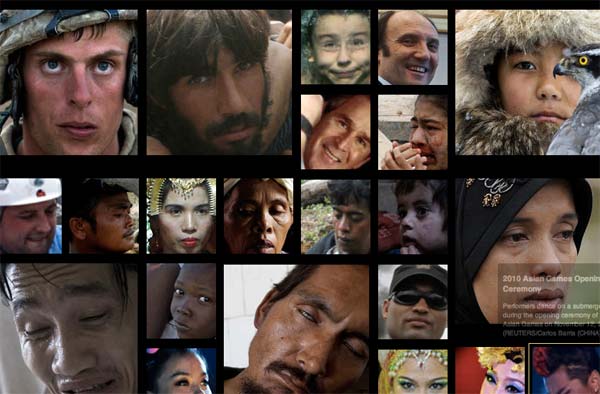
Big Faces – a mashup of The Big Picture and Face.com

Big Faces

Just put up another quick side project: Big Faces, which aggregates the excellent Big Picture Blog (by the Boston Globe and its many contributors) and just shows the faces. I used the Face.com API to crop the faces before uploading them.

I have in mind a multi-level photo-exploration app but because it’s been so long since I looked at using Backbone.js, I needed some practice. As it is, the fine work of the photographers and curators associated with The Big Picture stands on its own power. I probably should rethink it so it doesn’t require a 700K JSON download…

The process is simliar to the Congressmiles demo I did last week.

On the front end, this uses the excellent isotope JQuery plugin. It also has Backbone.js though I vastly simplified the project so much that I pretty much ditched using any of Backbone’s useful features. The Backbone boilerplate was extremely helpful, though, in organizing the project.

Best subway music ever: Super Mario Bros. theme

Musician Gypsy Joe Trane played the classics, including the theme to Nintendo Classic Super Mario Brothers on the R-train heading uptown Manhattan the other night. I can’t believe that no one else was (or at least looked) as amused as I was. I generally like subway performers and these guys had the best approach I’ve seen: just stand and jam for many stops. I don’t know if they made more or less money than those who do a quick set before hopping into another car, but I gave them a few bucks for the great accompaniment.

Woody Allen: Every step is part of the writing process

Woody Allen (2006), photo by Colin Swan

One of the best books I’ve picked up recently is Eric Lax’s Conversations with Woody Allen: His Films, the Movies, and Moviemaking, which is basically a 400+ page interview, spanning decades, between the author and Allen. I’m a fair-weather fan myself, I’ve only seen a few of his movies but I’ve always admired his relentless pursuit for his art, even when some of it seems to just be screwball comedy.

The book is divided into 8 parts for different facets of Allen’s work, including “Writing It”, “Shooting, Sets, Locations” and “Directing.” The following excerpt comes from the “Editing” part and in it, Allen talks about how he sees every step of filmmaking as part of the writing process (emphasis added):

[Eric Lax]: You’re involved with the details of every step of a film, and I’ve noticed that you do not delegate any part of its creation, even assembling a first cut from takes you’ve already selected.

[Woody Allen]: To me the movie is a handmade product. I was watching a documentary on editing on television the other day and many wonderful filmmakers were on and wonderful editors and everyone was talking briefly about how they edit. Years ago, they would turn it over to an editor. Or there are people I know who finish shooting and go away for a vacation and let the editor do a draft; then they come back and they check it out and do their changes.

I can’t do that. It would be unthinkable for me not to be in on every inch of movie – and this is not out of any sort of ego or sense of having to control; I just can’t imagine it any other way. How could I not be in on the editing, on the scoring, because I feel that the whole project is one big writing project?

You may not be writing with a typewriter once you get past the script phase, but when you’re picking locations and casting and on the set, you’re really writing. You’re writing with film, and you’re writing with film when you edit it together and you put some music in. This is all part of the writing process for me.

Lax, Eric (2009-08-12). Conversations with Woody Allen (p. 284). Random House, Inc.. Kindle Edition.

I feel the exact same way about any kind of modern storytelling. Whether it’s done as a photo essay, movie, or news application/website, each step of the process can profoundly affect and be affected by your editorial vision. Back in the day of traditional journalism, it’s possible that you could have one person do just the interviewing and research and then one person to put it as story form. But the feedback in that process – an unexpectedly emotional interview that alters what you previously thought the story arc should be – would almost be entirely lost.

Google’s search has been dumbed down for the novices and solipsistic

In response to Google’s latest plan to combine all your usage data on all of its platforms (GMail, Youtube, etc.) into one tidy user-and-advertiser-friendly package, I’m mostly sitting on the fence. This is because I’ve always assumed everything I type into Google Search will inextricably be linked to my personal GMail account…so I try not to search for anything job/life-sensitive in the same browser that I use GMail for.

But even before this policy, Google’s vanilla search (not the one inside Google+) has noticeably gotten too personalized. Not in a creepy sense, but in a you’re-too-dumb-to-figure-out-an-address bar way. And this is not a good feature for us non-novice Internet users.

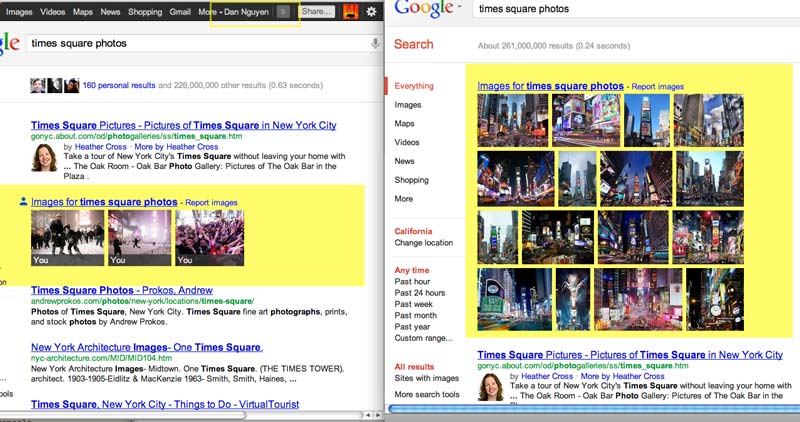
For example, I’ve been in a admittedly-petty, losing competition with the younger, better-muscled Dan Nguyen for the top of Google’s search results. My identity (this blog, danwin.com) has always come in second-place or lower…unless I perform a search for my name while logged into my Google/GMail account:

Me on Google Search. I am logged in on the left browser, logged out on the right.

The problem isn’t that my blog shows up first for my little search universe. It’s that my Google+ profile is on top, pushing all the other search results below the fold.

This seems really un-useful to me. The link to my own Google+ profile already occupies the top-left corner of my browser every time I visit a Google-owned site. I don’t need another prominent link to it. But I’ll give Google the benefit of the doubt here; they’re making the reasonable guess that someone who is searching for their own name is just looking for their own stuff…though conveniently, Google thinks the most important stuff about the searcher happens to be the searcher’s Google+ profile.

So here’s a more general example. I do a lot of photography and am always interested in what other people are doing. So here’s a search for “times square photos” in normal search (image search seems to behave the same way logged in or out):

'times square photos' on Google Search. I am logged in on the left browser, logged out on the right.

I generally love how Google automatically includes multimedia when relevant; for example, I rarely go to Google Maps now because typing in an address in the general search box, like “50 broadway” will bring up a nice local map. But in the case of “times square photos,” Google automatically assumes that I’m most interested in my own Times Square photos.

I may be a little solipsistic, but this is going overboard. And it seems counter-productive. If I’m the type of user to continually look up different kind of photos and all I see right away are my own photos, my search universe is going to be slightly duller.

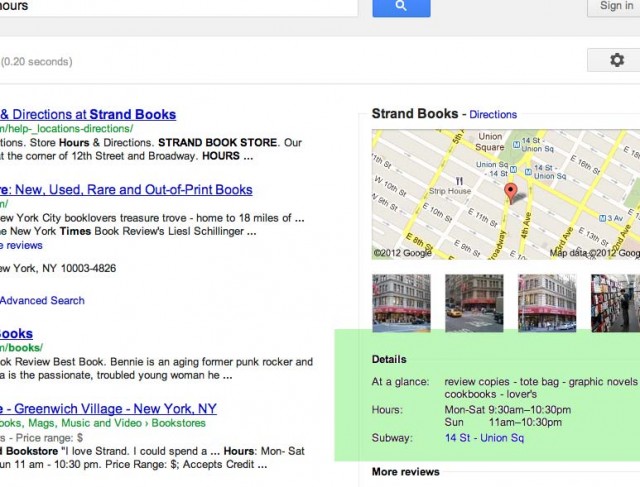
Wasn’t the original assumption of search was that the user is looking for something he/she doesn’t currently know? Like, the hours of my favorite bookstore. Doing that search pulls up a helpful sidebox, with the hours, next to the search results:

The Strand's opening hours

This is fantastic. And I do appreciate Google catering to my caveman of the question, especially when I’m on a mobile device.

But in the case of my example photo and name search, Google has gone a step too far in dumbing things down.

My hypothesis is that they are catering to the legion of users who get to yahoo.com by going to Google and typing in “Yahoo.” I imagine Google’s massive analytics system has told them that this is how many users get to GMail, as opposed to typing in gmail.com.

Google seems to be making this apply to every kind of search: when I type in a search query for “dan nguyen” or “times square photos”, Google checks to see if these are terms in my Google profile. If so, it pushes them to the top of the search pile because I must be one of those idiots who doesn’t realize that the Dan+ in the top left corner is how I get to my Google profile or that is too lazy to go to Flickr to look up my own Times Square photos.

The kicker is that that assumption contradicts my behavior. If I’m a user who was technical enough to figure out how to fill out my Google profile and properly link up third-party accounts…aren’t I the type of user who’s technical enough to get to my own Flickr photos by myself?

Searching for my own name is stupid, and kind of an edge case. But what if I’m working on a business site and have linked it (and/or its Google+ page) to my profile? And then I’m constantly doing searches to see how well that site is doing in SEO and SiteRank compared to similarly named/themed sites? Since I’m not in that situation, I can only guess: but will I have to use a separate browser just to get a reliable, business-savvy search?

I realize that this dumbing-down “feature” is the kind of thing that has to be auto-opt-in for its target audience. But I can think of a slightly non-intrusive way to make it manually opt-in. If what I really want are my own Times Square photos, then wait for me to prepend a “my” to the query. I’d think even the novice users could get into this habit.

Analyzing the U.S. Senate Smiles: A Ruby tutorial with the Face.com and NYT Congress APIs

U.S. Senate Smiles, ranked by Face.com face-detection algorithm

The smiles of your U.S. Senate from most smiley-est to least, according to Face.com's algorithm

Who’s got the biggest smile among our U.S. senators? Let’s find out and exercise our Ruby coding and civic skills. This article consists of a quick coding strategy overview (from the full code is at my Github). Or jump here to see the results, as sorted by Face’s algorithm.

About this tutorial

This is a Ruby coding lesson to demonstrate the basic features of Face.com’s face-detection API for a superficial use case. We’ll mash with the New York Times Congress API and data from the Sunlight Foundation.

The code comprehension is at a relatively simple level and is intended for learning programmers who are comfortable with RubyGems, hashes, loops and variables.

If you’re a non-programmer: The use case may be a bit silly here but I hope you can view it from an abstract-big-picture level and see the use of programming to: 1) Make quick work of menial work and 2) create and analyze datapoints where none existed before.

On to the lesson!

The problem with portraits

For the SOPA Opera app I built a few weeks ago, I wanted to use the Congressional mugshots to illustrate
the front page. The Sunlight Foundation provides a convenient zip file download of every sitting Congressmember’s face. The problem is that the portraits were a bit inconsistent in composition (and quality). For example, here’s a usable, classic head-and-shoulders portrait of Senator Rand Paul:

Sen. Rand Paul

But some of the portraits don’t have quite that face-to-photo ratio; Here’s Sen. Jeanne Shaheen’s portrait:

Sen. Jeanne Shaheen

It’s not a terrible Congressional portrait. It’s just out of proportion compared to Sen. Paul’s. What we need is a closeup crop of Sen. Shaheen’s face:

Sen. Jeanne Shaheen's face cropped

How do we do that for a given set of dozens (even hundreds) of portraits that doesn’t involve manually opening each image and cropping the heads in a non-carpal-tunnel-syndrome-inducing manner?

Easy face detection with Face.com’s Developer API

Face-detection is done using an algorithm that scans an image and looks for shapes proportional to the average human face and containing such inner shapes as eyes, a nose and mouth in the expected places. It’s not as if the algorithm has to have an idea of what an eye looks like exactly; two light-ish shapes about halfway down what looks like a head might be good enough.

You could write your own image-analyzer to do this, but we just want to crop faces right now. Luckily, Face.com provides a generous API that when you send it an image, it will send you back a JSON file in this format:

{
    "photos": [{
        "url": "http:\/\/face.com\/images\/ph\/12f6926d3e909b88294ceade2b668bf5.jpg",
        "pid": "F@e9a7cd9f2a52954b84ab24beace23046_1243fff1a01078f7c339ce8c1eecba44",
        "width": 200,
        "height": 250,
        "tags": [{
            "tid": "TEMP_F@e9a7cd9f2a52954b84ab24beace23046_1243fff1a01078f7c339ce8c1eecba44_46.00_52.40_0_0",
            "recognizable": true,
            "threshold": null,
            "uids": [],
            "gid": null,
            "label": "",
            "confirmed": false,
            "manual": false,
            "tagger_id": null,
            "width": 43,
            "height": 34.4,
            "center": {
                "x": 46,
                "y": 52.4
            },
            "eye_left": {
                "x": 35.66,
                "y": 44.91
            },
            "eye_right": {
                "x": 58.65,
                "y": 43.77
            },
            "mouth_left": {
                "x": 37.76,
                "y": 61.83
            },
            "mouth_center": {
                "x": 49.35,
                "y": 62.79
            },
            "mouth_right": {
                "x": 57.69,
                "y": 59.75
            },
            "nose": {
                "x": 51.58,
                "y": 56.15
            },
            "ear_left": null,
            "ear_right": null,
            "chin": null,
            "yaw": 22.37,
            "roll": -3.55,
            "pitch": -8.23,
            "attributes": {
                "glasses": {
                    "value": "false",
                    "confidence": 16
                },
                "smiling": {
                    "value": "true",
                    "confidence": 92
                },
                "face": {
                    "value": "true",
                    "confidence": 79
                },
                "gender": {
                    "value": "male",
                    "confidence": 50
                },
                "mood": {
                    "value": "happy",
                    "confidence": 75
                },
                "lips": {
                    "value": "parted",
                    "confidence": 39
                }
            }
        }]
    }],
    "status": "success",
    "usage": {
        "used": 42,
        "remaining": 4958,
        "limit": 5000,
        "reset_time_text": "Tue, 24 Jan 2012 05:23:21 +0000",
        "reset_time": 1327382601
    }
}		
	

The JSON includes an array of photos (if you sent more than one to be analyzed) and then an array of tags – one tag for each detected face. The important part for cropping purposes are the attributes dealing with height, width, and center:

		"width": 43,
      "height": 34.4,
      "center": {
          "x": 46,
          "y": 52.4
      },	
	

These numbers represent percentage values from 0-100. So the width of the face is 43% of the image’s total width. If the image is 200 pixels wide, then the face spans 86 pixels.

Using your favorite HTTP-calling library (I like the RestClient gem), you can simply ping the Face.com API’s detect feature to get these coordinates for any image you please.

Image manipulation with RMagick

So how do we do the actual cropping? By using the RMagick (a Ruby wrapper for the ImageMagick graphics library) gem, which lets us do crops with commands as simple as these:

img = Magick::Image.read("somefile.jpg")[0]

# crop a 100x100 image starting from the top left corner
img = img.crop(0,0,100,100) 

The RMagick documentation page is a great place to start. I’ve also written an image-manipulation chapter for The Bastards Book of Ruby.

The Process

The code for all of this is stored at my Github account.

I’ve divided this into two parts/scripts. You could combine it into one script but to make things easier to comprehend (and to lessen the amount of best-practices error-handling code for me to write), I divide it into a “fetch” and “process” stage.

In the fetch.rb stage, we essentially download all the remote files we need to do our work:

  • Download a zip file of images from Sunlight Labs and unzip it at the command line
  • Use NYT’s Congress API to get latest list of Senators
  • Use Face.com API to download face-coordinates as JSON files

In the process.rb stage, we use RMagick to crop the photos based from the metadata we downloaded from the NYT and Face.com. As a bonus, I’ve thrown in a script to programmatically create a crude webpage that ranks the Congressmembers’ faces by smile, glasses-wearingness, and androgenicity. How do I do this? The Face.com API handily provides these numbers in its response:

	"attributes": {
            "glasses": {
                "value": "false",
                "confidence": 16
            },
            "smiling": {
                "value": "true",
                "confidence": 92
            },
            "face": {
                "value": "true",
                "confidence": 79
            },
            "gender": {
                "value": "male",
                "confidence": 50
            },
            "mood": {
                "value": "happy",
                "confidence": 75
            },
            "lips": {
                "value": "parted",
                "confidence": 39
            }
        }
	

I’m not going to reprint the code from my Github account, you can see the scripts yourself there:

https://github.com/dannguyen/Congressmiles

First things first: sign up for API keys at the NYT and Face.com

I also use the following gems:

The Results

Here’s what you should see after you run the process.rb script (all judgments made by Face.com’s algorithm…I don’t think everyone will agree with about the quality of the smiles):


10 Biggest Smiles

Sen. Wicker (R-MS)
Sen. Wicker (R-MS) [100]
Sen. Reid (D-NV)
Sen. Reid (D-NV) [100]
Sen. Shaheen (D-NH)
Sen. Shaheen (D-NH) [99]
Sen. Hagan (D-NC)
Sen. Hagan (D-NC) [99]
Sen. Snowe (R-ME)
Sen. Snowe (R-ME) [98]
Sen. Kyl (R-AZ)
Sen. Kyl (R-AZ) [98]
Sen. Klobuchar (D-MN)
Sen. Klobuchar (D-MN) [98]
Sen. Crapo (R-ID)
Sen. Crapo (R-ID) [98]
Sen. Johanns (R-NE)
Sen. Johanns (R-NE) [98]
Sen. Hutchison (R-TX)
Sen. Hutchison (R-TX) [98]


10 Most Ambiguous Smiles

Sen. Inouye (D-HI)
Sen. Inouye (D-HI) [40]
Sen. Kohl (D-WI)
Sen. Kohl (D-WI) [43]
Sen. McCain (R-AZ)
Sen. McCain (R-AZ) [47]
Sen. Durbin (D-IL)
Sen. Durbin (D-IL) [49]
Sen. Roberts (R-KS)
Sen. Roberts (R-KS) [50]
Sen. Whitehouse (D-RI)
Sen. Whitehouse (D-RI) [52]
Sen. Hoeven (R-ND)
Sen. Hoeven (R-ND) [54]
Sen. Alexander (R-TN)
Sen. Alexander (R-TN) [54]
Sen. Shelby (R-AL)
Sen. Shelby (R-AL) [62]
Sen. Johnson (D-SD)
Sen. Johnson (D-SD) [63]

The Non-Smilers

Sen. Bingaman (D-NM)
Sen. Bingaman (D-NM) [79]
Sen. Coons (D-DE)
Sen. Coons (D-DE) [77]
Sen. Burr (R-NC)
Sen. Burr (R-NC) [72]
Sen. Hatch (R-UT)
Sen. Hatch (R-UT) [72]
Sen. Reed (D-RI)
Sen. Reed (D-RI) [71]
Sen. Paul (R-KY)
Sen. Paul (R-KY) [71]
Sen. Lieberman (I-CT)
Sen. Lieberman (I-CT) [59]
Sen. Bennet (D-CO)
Sen. Bennet (D-CO) [55]
Sen. Udall (D-NM)
Sen. Udall (D-NM) [51]
Sen. Levin (D-MI)
Sen. Levin (D-MI) [50]
Sen. Boozman (R-AR)
Sen. Boozman (R-AR) [48]
Sen. Isakson (R-GA)
Sen. Isakson (R-GA) [41]
Sen. Franken (D-MN)
Sen. Franken (D-MN) [37]


10 Most Bespectacled Senators

Sen. Franken (D-MN)
Sen. Franken (D-MN) [99]
Sen. Sanders (I-VT)
Sen. Sanders (I-VT) [98]
Sen. McConnell (R-KY)
Sen. McConnell (R-KY) [98]
Sen. Grassley (R-IA)
Sen. Grassley (R-IA) [96]
Sen. Coburn (R-OK)
Sen. Coburn (R-OK) [93]
Sen. Mikulski (D-MD)
Sen. Mikulski (D-MD) [93]
Sen. Roberts (R-KS)
Sen. Roberts (R-KS) [93]
Sen. Inouye (D-HI)
Sen. Inouye (D-HI) [91]
Sen. Akaka (D-HI)
Sen. Akaka (D-HI) [88]
Sen. Conrad (D-ND)
Sen. Conrad (D-ND) [86]


10 Most Masculine-Featured Senators

Sen. Bingaman (D-NM)
Sen. Bingaman (D-NM) [94]
Sen. Boozman (R-AR)
Sen. Boozman (R-AR) [92]
Sen. Bennet (D-CO)
Sen. Bennet (D-CO) [92]
Sen. McConnell (R-KY)
Sen. McConnell (R-KY) [91]
Sen. Nelson (D-FL)
Sen. Nelson (D-FL) [91]
Sen. Rockefeller IV (D-WV)
Sen. Rockefeller IV (D-WV) [90]
Sen. Carper (D-DE)
Sen. Carper (D-DE) [90]
Sen. Casey (D-PA)
Sen. Casey (D-PA) [90]
Sen. Blunt (R-MO)
Sen. Blunt (R-MO) [89]
Sen. Toomey (R-PA)
Sen. Toomey (R-PA) [88]


10 Most Feminine-Featured Senators

Sen. McCaskill (D-MO)
Sen. McCaskill (D-MO) [95]
Sen. Boxer (D-CA)
Sen. Boxer (D-CA) [93]
Sen. Shaheen (D-NH)
Sen. Shaheen (D-NH) [93]
Sen. Gillibrand (D-NY)
Sen. Gillibrand (D-NY) [92]
Sen. Hutchison (R-TX)
Sen. Hutchison (R-TX) [91]
Sen. Collins (R-ME)
Sen. Collins (R-ME) [90]
Sen. Stabenow (D-MI)
Sen. Stabenow (D-MI) [86]
Sen. Hagan (D-NC)
Sen. Hagan (D-NC) [81]
Sen. Ayotte (R-NH)
Sen. Ayotte (R-NH) [79]
Sen. Klobuchar (D-MN)
Sen. Klobuchar (D-MN) [79]

For the partisan data-geeks, here’s some faux analysis with averages:

Party Smiles Non-smiles Avg. Smile Confidence
D 44 7 85
R 42 5 86
I 1 1 85

There you have it, the Republicans are the smiley-est party of them all.

Further discussion

This is an exercise to show off the very cool Face.com API and to demonstrate the value of a little programming knowledge. Writing the script doesn’t take too long, though I spent more time than I liked on idiotic bugs of my own making. But this was way preferable than cropping photos by hand. And once I had the gist of things, I not only had a set of cropped files, I had the ability to whip up any kind of visualization I needed with just a minute’s more work.

And it wasn’t just face-detection that I was using, but face-detection in combination with deep data-sources like the Times’s Congress API and the Sunlight Foundation. For the SOPA Opera app, it didn’t take long at all to populate the site with legislator data and faces. (I didn’t get around to using this face-detection technique to clean up the images, but hey, I get lazy too…)

Please don’t judge the value of programming by my silly example here – having an easy-to-use service like Face.com API (mind the usage terms, of course) gives you a lot of great possibilities if you’re creative. Off the top of my head, I can think of a few:

  • As a photographer, I’ve accumulated thousands of photos but have been quite lazy in tagging them. I could conceivably use Face.com’s API to quickly find photos without faces for stock photo purposes. Or maybe a client needs to see male/female portraits. The Face.com API gives me an ad-hoc way to retrieve those without menial browsing.
  • Data on government hearing webcasts are hard to come by. I’m sure there’s a programmatic way to split up a video into thousands of frames. Want to know at which points Sen. Harry Reid shows up? Train Face.com’s API to recognize his face and set it loose on those still frames to find when he speaks.
  • Speaking of breaking up video…use the Face API to detect the eyes of someone being interviewed and use RMagick to detect when the eyes are closed (the pixels in those positions are different in color than the second before) to do that college-level psych experiment of correlating blinks-per-minute to truthiness.

Thanks for reading. This was a quick post and I’ll probably go back to clean it up. At some point, I’ll probably add this to the Bastards Book.

A Million Pageviews, Thousands of Dollars Poorer, and Still Countlessly Richer.

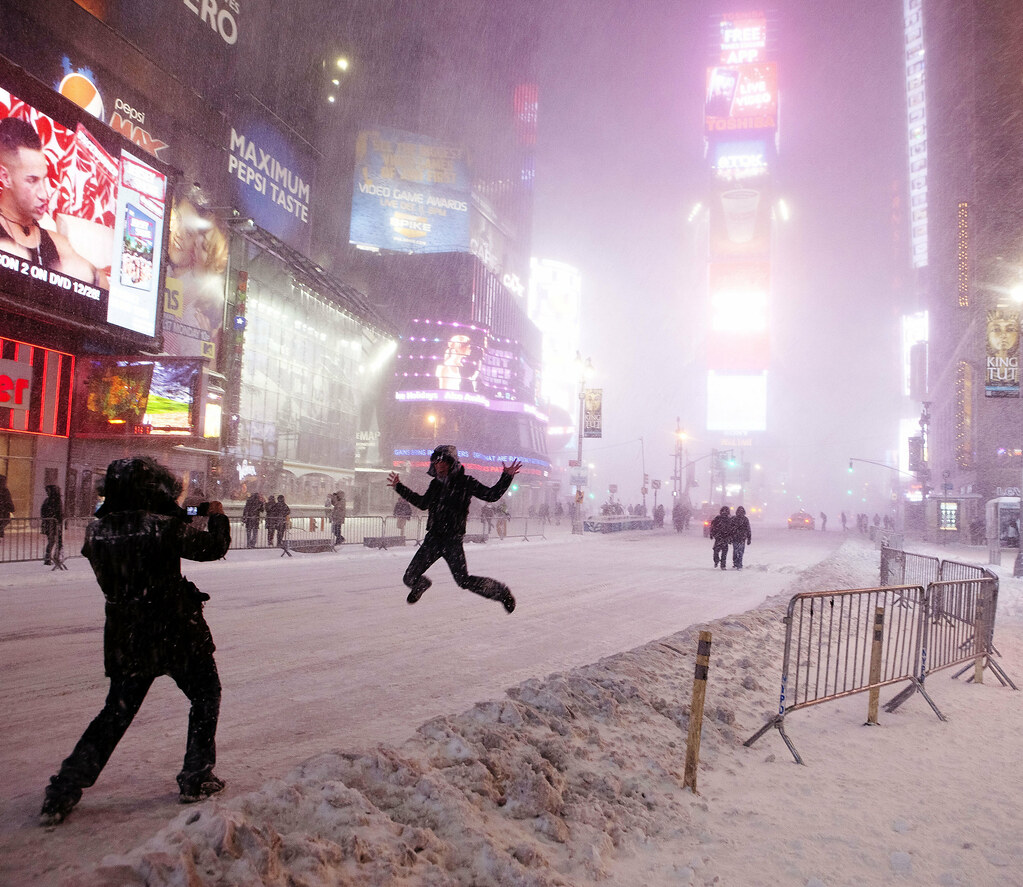
Snowball fight in Times Square, Manhattan, New York

Update: This post rambled longer than I intended it to and I forgot that I had meant to include some observations on what I’ve noticed about Flickr’s traffic pattern. I’ve added some grafs to the bottom of this post.

My Flickr account hit 1,000,000 pageviews this weekend. Two years ago, I bought a Pro account shortly after the above photo of some punk kid throwing a snowball at me in Times Square was posted on Flickr’s blog. Since then I set my account to share all of my photos under the Creative Commons Non-commercial license (but I’ve let anyone who asks use them for free).

My account was on track to have 500K pageviews by October (of this past year) but then this photo of pilots marching on Wall Street hit Reddit and attracted 150K views all by itself, so then a million total views seemed just around the corner :).

Net Profit

Mermaid Parade 2010, Coney Island

I was paid $120 for this photo, which was used in New York’s campaign to remind people that they can’t smoke in Coney Island (or any other public park).


So how much have I gained monetarily in these two years of paying for a Flickr Pro account?

Two publications offered a total of $135 for my work. Minus the two years of Pro fees ($25 times 2 years) and that comes to about $80. If I spent at minimum 1 minute to shoot, edit, process, and upload each of my ~3,100 photos, I made a rate of $1.50/hour for my work.

Of course, I’ve spent much more time than one minute per photo. And I’ve taken far more than 3,100 photos (I probably have 15 to 20 times as many stored on my backup drives). And of course, thousands of dollars for my photo equipment, including repairs and replacements. So:

  • + $135 from publications
  • – $50 for Flickr Pro fees
  • – $8,000 (and change) for Canon 5D Mark 2, Canon S90, lenses, repairs from constant use in the rain/snow/etc.

So doing the math…I’m several thousands of dollars in the hole.

Gains

Monetarily, my photography is a large loss for me. I’m lucky enough to have a job (and, for better or worse, no car or mortgage and few other hobbies to pay for) to subsidize it. So why do I keep doing it and, in general, giving away my work for free?

Well, there is always the promise of potential gain:

  • I made a $1,000 (mostly to cover expenses) to shoot a friend’s wedding because his fiance liked the work I posted on my Facebook account…but weddings are so much work that I’ve decided to avoid shooting them if I can help it.
  • I’ve also taken photos for my job at ProPublica, including this portrait for a story that was published in the Washington Post. I’m not employed specifically to take photos, but it’s nice to be able to do it on office time.
  • I also now have a large cache of stock photos to use for the random sites I build. For example, I used the Times Square snowball photo to illustrate a programming lesson on image manipulation and face-recognition technology.
  • Even if my photos were up to professional par, I’m not the type to declare (in person) to others, “Hey, one of my hobbies is photography. Look at these pictures I took.” Flickr/Facebook/Tumblr is a nice passive-humblebrag way to show this side passion to others. And I’ve made a few good friends and new opportunities because of the visibility of my work.

In the scheme of things, a million pageviews is not a lot for two years…A photo might get that in a few days if it’s a popular enough meme. And pageviews have only a slight correlation to actual artistic merit (neither the above snowball or pilot photos are my favorite of the series). But it’s amazing and humbling to think that – if the average visitor who stumbles on my account might look at 4 photos – something I’ve done as a hobby might have reached nearly a quarter million people (not counting the times when sites take advantage of the CC-licensing and reprint my photos).

Having any kind of audience, no matter how casual, is necessary to practice improve my art if I were to ever try to become a paid professional photographer. So that’s one important way that I’m getting something from my online publishing.

Photos are as free as the photographer wants them to be

My personal milestone coincidently comes after the posting of two highly-linked-to articles on the costs of a photo: This Photograph is Not Free by John Mueller and This Photograph is Free by Tristan Nitot. They both make good points (Mueller’s response to Nitot is nuanced and deserves to also be considered).

Mueller and Nitot aren’t necessarily at odds at each other so there’s not much for me to add. Photos are worth good money. To cater to a client, to buy the (extra) professional equipment, to spend more time in editing and post-processing (besides cropping, color-correction and contrast, I don’t do much else to my photos), to take more time to be there at an assignment – this is all most definitely worth charging for.

And that is precisely why I don’t put the effort into marketing or selling mine. The money isn’t worth taking that amount of time and energy from what I currently consider my main work and passion. However, what I’ve gotten so far from my photography – the extra incentive to explore the great city I live in, the countless friends and memories, and of course, the photos to look back on and reuse for whatever I want – the $8,000 deficit is easily covered by that. Having the option to easily share my photos to (hopefully) inspire and entertain others is icing.

One more side-benefit of using a public publishing system like Flickr: I couldn’t devise a better way to organize and browse my own work with minimal effort. And I’m often rediscovering what I considered to be throwaway photos because others find them interesting.

Here are a few other photos I’ve taken over the years that were either frequently-viewed or considered “interesting” by Flickr’s bizarre algorithm:

Jumping for joy during New York blizzard, Times Square
The Cat is the Hat
Sunset over Battery Park and Statue of Liberty
Woman in white, pilots
Pushing a Taxi - New York Blizzard Snowstorm Thundersnow Blaaaaagh
Lightning strikes the Empire State Building
Brooklyn Bridge photographer-tourist, Photo of
Atrium, Museum of Natural History
Union Square Show
Casting Couch (#NYFW Spring 2012)
Williamsburg: Beautiful dogs
New York Snow Blizzard 2011, Lone Man on the Brooklyn Bridge
Ground Zero NY celebrates news of Osama bin Laden's death
Grand Central Moncler NYFW Flash Mob Dancin
Broadway Rainstorm
Towers of Light 9/11
Manhattanhenge from a Taxi

A few more observations on Flickr pageviews: It’s hard to say if 1,000,000 page views is a lot especially considering the number of photos I have uploaded in total. Before the pilots on Wall Street photo, I averaged about 200-500 pageviews a day. After that, I put more effort into maintaining my account and regularly uploading photos. Now on a given day, if I don’t upload anything particularly interesting the account averages about 1,500 views.

Search engines bring very little traffic. So other than what (lack of) interest my photos have for the general Internet, I think my upload-and-forget mindset towards my account also limits my pageviews. I have a good friend on Flickr who gets far fewer pageviews but gets far more comments than I do. I rarely comment on my contacts’ photos and barely participate in the various groups.

I’m disconnected enough from the Flickr social scene that I only have a very vague understanding of how its Explore section works. Besides the blog, the Explore collection is the best way to get seen on Flickr. It features “interesting” photos as determined by an algorithm that, as best I can tell, is affected by some kind of in-group metric.

I’ve only had three photos make it to Explore: the snowball fight in Times Square, the lightning hitting the Empire State Building, and this one where my subway train got stuck and we had to walk out the tunnel. The pilots photo did not make it to Explore, so I’m guessing that amount of traffic (particularly if a huge portion of it comes from one link on Reddit) is not necessarily a prime factor to getting noticed by Flickr’s algorithm.

New York in 2011, the photo version

A little late on this but I posted a few photos I took in NYC this year over at my Tumblr, Eye Heart New York.

This year seemed like my most sheltered, uncreative year yet…even so, according to Flickr’s count, 3/4 of the 3,000+ photos I’ve uploaded in total took place in 2011. I guess when so much just happens next to me (basically, OccupyWallStreet camping out a few blocks away) it’s hard not to snap a few pics. I almost broke the million views mark (for the two years that I’ve been on Flickr) and one of my photos finally made it on someone’s dining room wall, so not too bad a year no matter what it felt.

Here’s a few of the photos; visit Eye Heart New York for the rest:

Pre-Hurricane Irene: Naked Cowboy

WTC, eve of 9/11/2011

Casting Call, New York Fashion Week Spring 2012

Lightning strikes the Empire State Building

OccupyWallSt, day of canceled city cleaning Sit-in, jazz hands! OccupyWallStreet goes to occupy Times Square, 10/15/2011

High Line Park, Art Installation, Section 2

New Museum slide!

See the rest at Eye Heart New York

United/Continental pilots march on Wall Street