Fashionistas (and bureaucrats and journalists): Please learn to code

The technical part of this post is painful, but not this painful

Great programmers and thinkers have already railed against Jeff Atwood’s essay, “Please Don’t Learn to Code.”

But we haven’t heard enough from amateurs like me, nor has anyone, as Poynter’s Steve Myers claims, “written a single line of code” in response to Atwood.

Well, I may not be Zed Shaw but I have a knack for coming up with the most brain-numbing code snippets to deal with slightly more brain-numbing journalism-related tasks, such as extracting data from PDFs, scraping websites, producing charts, cropping photos, text processing with regular expressions, etc. etc..

But for this post I’ll try to show (with actual code) how programming can apply even to a field that’s about as far removed from compilers and data-mining that I can think of: fashion design

(insert joke about fat-models and skinny-controllers)

—-

Besides clearance sales at the flagship Macy’s, my main specific connection to the New York fashion industry comes from the few times that a friend of a friend hires me to take photos at a casting call.

I knew there were casting directors in TV and movie business. But I thought designers could just pick for themselves the models. Well, they do. But there’s still need for someone who handles relations with modeling agencies, managing the logistics of bringing in and scheduling hundreds of models, and having the aesthetic sense to make valuable recommendations to the designers.

And, sometimes, there’s the occasional holy-shit-does-anyone-own-a-camera-because-this-came-up-at-the-last-minute scenarios that create the need for non-fashion professionals like me. During the day of the casting call, the director and designers are busy doing informal interviews of the models, skimming their lookbooks, and judging – yes, there seems to be a wide range of skill and style in this – their strut down the catwalk.

The models don’t show up primped as if it were a Vogue cover shoot, and they probably couldn’t maintain that look over the other 5 to 15 other casting calls they trek to throughout the day. Often, at least to me, they look nothing like they do in their lookbooks. Which is fine since the designers need to imagine whether they’d fit for their own collections.

So I take photos of the models – of the face looking at the camera, then looking off-camera, and then a full-length head-to-heels shot – and then say “thank you, next please.” The photos don’t even have to be great, only recognizable so that the designer and directors have something to refer to later on. It’s likely one of the easiest and most monotonous photo assignments (at least to the point that my brain starts to think about programming), like yearbook photo day at a high school where almost nobody smiles or blinks at the wrong time.

So casting calls are uncomplicated from my extremely limited standpoint. But there are logistical hassles that come into play. A friend of mine who actually does real work in fashion told me, when Polaroid film went out of production, casting directors “pretty much shit themselves.”

For the digital-only generation, Polaroids were great because they printed the photo right after it was taken. Having a physical photo just as the model is standing there made it easy to attach it to the model’s comp card for later reference.

With digital cameras, the photos are piled in a memory card’s folder under a sterile naming convention such as “DSC00023.jpg” and won’t materialize until the memory card is taken out, brought over and inserted into a computer, and then printed out. Unless I’m doing that right after each model, there has to be some system that tracks how “DSC00023.jpg” is a snapshot of “James S.” from Ford Models at the end of the day.

Stepping back from the material world of fashion, this is at its core a classic data problem: in lieu of instant print photography, we need to link one data source, the physical pile of comp cards containing each model’s name, agency, and sometimes measurements – with another – the folder of generically named photo files in my camera.

There’s nothing about the contents of the digital photo file that conclusively ties it to the real-life model and comp card. On a busy casting call, there are enough models to sort through and some of them look similar enough (or different from their comp card) that it’s not obvious which “normal” snapshot goes with the comp card’s highly-produced portrait.

Assuming the photographer hired is too cheap (i.e. me) to invest in wi-fi transmitters and the like, the director can throw old-fashioned human labor at the problem. I once had an assistant with an even more monotonous task than mine: writing down the name of each model and the photo filenames as I read them off my camera. The director has her own assistant who is also writing down the models’ names/info while collecting their cards.

Models holding up their comp cards

Having the models hold up their comp cards

One way to reduce the chance of error is to have the models hold up their comp cards as I take the snapshots. But no matter how error-free the process is, there’s still the tedious work of eyeballing hundreds of printouts and clipping them to the correct comp cards.

The code fix

Let’s assume that the procession of models is swift and substantial enough (200-500 for New York Fashion Week, depending how many shows the casting director has been hired for) that the chronological order of the physical comp cards and the digital photos is bound to be muddled.

So, in our traditional setup, the linking of the two data sources is done through facial/image recognition:

Casting director: “Hey, can you find me Aaron from Acme’s photos? He has brownish hair, bangs and freckles and I think he came earlier in the day.”
Assistants: “OK!” (they hurriedly look through the pile of photos until someone finds the photo matching the description. The photo could be near the top of the pile or at the bottom for all they know).

The code-minded approach: attach the name and agency information to the digital so there’s a way to organize them. They can, for instance, can be printed out and sorted into piles by agency and in alphabetical order.

Casting director: “Hey, can you find me Aaron from Acme’s photos?

Assistants: “OK!” (someone goes to the Acme pile, which is sorted alphabetically, and looks for “Aaron”).

So how do we get to this sortable, scalable situation without adding undue work, such as having the photographer rename the photos in-camera or printing them out after finishing up with each model? Here’s a possible code solution that efficiently labels the photos correctly long after the model has left the call:

  1. Have the photographer sync up his camera’s system time with your assistant’s laptop’s time.
  2. Have the assistant open up Excel or Google Spreadsheets and mark the time that the model has his/her photos taken:

  3. Name Agency Time
    Sara Acme 9:10:39 AM
    Svetlana Acme 9:12:10 AM
    James Ford 9:15:57 AM
  4. At the end of the day, tell the photographer to dump the photos into a folder, e.g. “/Photos/fashion-shoot”

And then finally, run some code. Here’s the basic thought process:

  • Each line represents a model, his/her agency, and their sign-in time
  • For each each line of the spreadsheet:
  • Read the sign-in time of that line and the sign-in time of the next
  • Filter the photofiles created after the sign-in time of the given model and before the sign-in time of the next model
  • Rename the files from “DSC00010.jpg” to a format such as: “Anna–Acme Models–01.jpg”

If you actually care, here’s some Ruby code, which is way more lines than is needed (I’ve written a condensed version beneath it) because I separate the steps for readability. I also haven’t run it yet so there may be a careless typo. Who cares, the exact code is not the point but feel free to send in corrections.

# include the Ruby library needed to 
# turn "9:12:30 AM" into a Ruby Time object	
require 'time'

# Grab an array of filenames from the directory of photos
photo_names = Dir.glob("/Photos/fashion-shoot/*.*")

# open the spreadsheet file (export the XLS to tab-delimited)
spreadsheet_file = open("spreadsheet.txt")

# read each line (i.e. row) into an array
array_of lines = spreadsheet_file.readlines

# split each line by tab-character, which effectively creates 
# an array of arrays, e.g. 
# [
#	["Sara", "Acme", "9:10:39 AM"],
#	["James", "Ford", "9:15:57 AM"]
# ]
lines = lines.map{ |line| line.chomp.split("\t") }[1..-1]

# (the above steps could all be one line, BTW)

# iterate through each line
lines.each_with_index do |line, line_number|


   # first photo timestamp (convert to a Time object)
   begin_time = Time.parse(line[2])
   
   # if the current line is the last line, then we just need the photos
   # that were last modified (i.e. created at) **after** the begin_time
   
   if line_number >= lines.length   
      models_photos = photo_names.select{|pf| File.mtime(pf) >= begin_time }      
   else
   
   	# otherwise, we need to limit the photo selection to files that came
   	# before after the begin_time of the **next row**
   
      end_time = Time.parse(lines[line_number + 1])
      models_photos = photo_names.select{ |pf| File.mtime(pf) >= 
			begin_time && File.mtime(pf) < end_time }
   end

   # now loop through each photo that met the criteria and rename them
   
   # model_name consists of the name and agency (the first two columns)
   model_name = line[0] + "--" + line[1] 

	models_photos.each_with_index do |photo_fname, photo_number|
      new_photo_name = File.join( File.dirname(photo_fname),
 			"#{model_name}--#{photo_number}.jpg" )

		# you should probably create a copy of the file rather 
		# than renaming the original...
      File.rename(photo_fname, new_photo_name)    
   end

end	

Here's a concise version of the code:

require 'time'
photo_names = Dir.glob("/Photos/fashion-shoot/*.*")
lines = open("spreadsheet.txt").readlines.map{ |line|  line.chomp.split("\t") }[1..-1]
	
lines.each_with_index do |line, line_number|
	begin_time = Time.parse(line[2])
	end_time = line_number >= lines.length ? Time.now : Time.parse(lines[line_number + 1])
	
	photo_names.select{ |pf| File.mtime(pf) >= begin_time && 
		File.mtime(pf) < end_time }.each_with_index do |photo_fname, photo_number|
      new_photo_name = File.join( File.dirname(photo_fname),
 			"#{line[0]}--#{line[1]}--#{photo_number}.jpg" )
		File.rename(photo_fname, new_photo_name)    
   end
end

The end result is a directory of photos renamed from the camera's default (something like DSC00026.jpg) to something more useful at a glance, such as Sara-Acme-1.jpg, Sara-Acme-2.jpg and so forth. The filenames are printed out with the images.

So even if the physical comp cards are all out of chronological order, it's trivial to match them alphabetically (by name and agency) to the digital photo print outs. As a bonus, if someone is taking videos of each model's walk on a phone and dumps those files into the photo directory, those files would also be associated to the model (this might require a little more logic given the discrepancy between the photo shoot and catwalk test).

With a few trivial modifications to the code, a coding-casting director can make life even easier:

  • Add a Yes/No column to the spreadsheet. You'd either enter this value in yourself or give some kind of signal to your assistant (ideally more subtle than "thumbs up/thumbs down" while the model is still standing there). And so you could save yourself the trouble of printing photos of the non-viable candidates.
  • Why even use a printer? Produce a webpage layout of the photos (add a few lines that print HTML: "<img src='Sara-Acme-1.jpg'>")
  • If the client is old-style and wants the photos in hand as she marks them up and makes the artistic decision of which model would look best for which outfit, then you can at least resize and concatenate the photos with some simple ImageMagick code so that they print out on a single sheet (like in a photo booth), reducing your printing paper and ink costs. Congratulations, you just saved fashion and the Earth.
  • If you hire a cheapo photographer (like myself) who didn't buy/bring the lighting equipment/batteries needed to keep consistent lighting as the daylight fades, then models who show up at the end of the call will be more lit up (and probably more reddish) by artificial lightings. A line of code could automatically adjust the white balance (maybe by executing a PhotoShop action) depending on the timestamp of the photo.
  • Fashion bloggers: speaking of color adjustments, you can get in on this programmatic color-detecting action too: if your typical work consists of curating photos of outfits/accessories that you like, but you've done a terrible job taking the time to tag them properly, then you can use ImageMagick to determine the dominant hue (probably in the middle of the photo) and auto-edit the metadata. Now you can create pages that display fashion items by color and so with no manual labor and fairly easy coding work on your part, your readers have an extra reason to stay on your site.

#NYFW Model, headshot

A model has her face photographed, from a casting call during NY Fashion Week Spring 2012.

Forget the details, though. The important point is that someone with code can abstract out the steps of this chore and – just as importantly – expedite them without adding work. They see how to exploit what already has to be collected (photos, names) and use what is essentially useless to non-coders (file timestamps, metadata). And, thanks to the speed of computing, the menial parts of the job are reduced, allowing more time and energy for the "fun", creative part.

Of course the number of times I've offered to do this for a director (or any similar photojob) is zero. It's not the code-writing that's hard. It's understanding all the director's needs and processes and explaining to and getting everyone to follow even the minimal steps outlined above. It's much easier for me to just stick to my role of bringing a camera and pressing its button a thousand or so times. The incentive to implement this pedantic but life-improving code rests within the person whose happiness and livelihood is directly related to the number of hours spent pointlessly sifting papers.

But since casting calls have gone fine for directors without resorting to this fancy code thing – or else they would no longer be casting directors – why fix what's not yet broken, right?

Jeff Atwood writes, "Don't celebrate the creation of code, celebrate the creation of solutions." In other words, focus on what you do best and let the experts handle the code. But the problem is not that non-coders can't create these solutions themselves. The problem is that they don't even know these solutions exist or why they are needed.

They suffer from, as Donald Rumsfeld described best, the "things we do not know we don't know." But so do those on the other side of the equation; expert coders really don't grasp the innumerable and varied obstacles facing non-coders. So isn't it a little premature to dismiss the potential of a more code-literate world?

It's a bit like the church, soon after Gutenberg's breakthrough, telling everyone: Hey, why waste your already-short lives trying to become literate? It's hard work; we know, because our monks and clerics devote their entire lives to it. So even if you do learn to read, you're likely to make some uneducated, sacrilegious misinterpretation of our holy texts and spend the afterlife in eternal damnation. So all you need to know is that books contain valuable information and that we have experts who can extract and interpret that information for you. That's what we've done for centuries and things have gone very well so far, right?

I don't mean at all to imply that Atwood wants to keep knowledge from the masses. But I do think he vastly underestimates the gulf of conceptual grasp between a non-programmer and even a first-year programmer. And he undervalues the potential (and necessity, IMHO) of programming to teach these abstract concepts.

Erik Hinton from the New York Times puts it nicely:

If you don't know how to program, you filter out all parts of the world that involve programming. You miss the loops and divide-and-conquers of everyday life. You cannot recognize programming problems without the understanding that outlines these problems against the noise of useless or random information.

Atwood imagines that non-programmers can somehow "get" the base level of data literacy and understanding of abstraction that most programmers take for granted. I'd like to think so, but this is not the case even for professionals far more grounded in logic and data than is the fashion world, including researchers, scientists, and doctors. For instance, check out researcher Neil Saunders's dispatches on attempting to introduce code and its wide-scale benefits to the world of bioinformatics.

So I too am skeptical that Mayor Bloomberg, despite his resolution to learn to code, will ever get around to creating even the classic beginners customer-cart Rails app. But perhaps his enthusiasm will trickle down to whoever's job it is to realize that maybe, the world's greatest city just might be able to find a better way to inform its citizens about how safe they are than through weekly uploads of individual PDF files (Or maybe not. Related: see this workaround from ScraperWiki).

My own journalism career benefits from being able to convert PDFs to data at a rate/accuracy equivalent to at least five or more interns. But I'd gladly trade that edge for a world in which such contrived barriers were never conceived. We don't need a bureaucrat who can install gcc. I'll settle for one who remembers enough about for loops and delimiters and can look a vendor in the eye and say, "Thank you for demonstrating your polished and proprietary Flash-powered animated chart/export-to-PDF plugin, which we will strongly consider during a stronger budget year. But if you could just leave the data in a tab-delimited text file, my technicians can take care of it."

I do share some of Atwood's disdain that the current wave of interest in coding seems to be more about how "cool" it is rather than something requiring real discipline. So don't think of coding as cool because that implies that you are (extremely) uncool when you inevitably fail hard and fast at it in the beginning. Focus instead on what's already cool in your life and work and see how code can be, as Zed Shaw puts it, your secret weapon.

How can coding help non-professional programmers? I've already mentioned Neil Saunders in bioinformatics; here are a few others that came from the Hacker News discussion in response to Atwood: 1, 2, 3, 4, 5. Finding this purpose for programming may not be obvious at first. But hey, it exists even for fashion professionals.

-----

Some resources: I think Codecademy is great for at least getting past the technical barriers (i.e. setting up your computer's development environment) to try out some code. But you'll need further study, and Zed Shaw's Learn Code the Hard Way is an overwhelmingly popular (and free) choice. There's also the whimsical why's poignant guide to Ruby. And I'm still on my first draft of the Bastards Book of Ruby, which attempts to teach code through practical projects.
Bastards Book of Ruby has a Hacker News revival

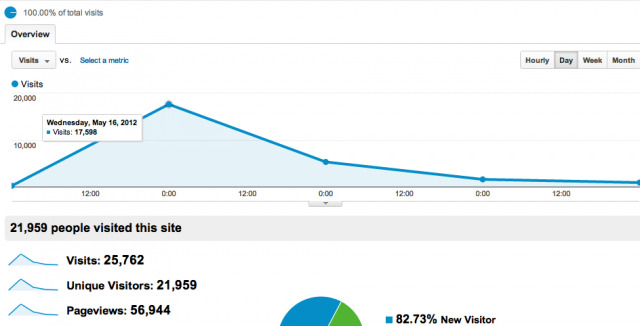
Bastards Book HN spike

The Hacker News traffic spike for the Bastards Book of Ruby

I’ve procrastinated in updating my book of practical Ruby coding. But the site got an unexpected boost in interest and traffic when someone posted it to Hacker News this past week, possibly in response to the “Please Don’t Learn to Code” debate started by Jeff Atwood.

Sidenote: The Bastards Book did reach the front page when I submitted its introductory essay, aptly titled “Programming is for Anyone.” That sprawling essay needs to be revised but I believe it in even more.

The HN posting reached the top, something I couldn’t get it to do back when I originally posted the draft. It was encouraging to see the need for something like this out there and makes me want to jump back into this as a summer project. I’ve definitely thought of many more examples to include and have hopefully become a better writer.

The main “fix” will be moving it from my totally-overkill Ruby-on-Rails system, structuring the book’s handmade HTML code into something simple enough for Markdown, and pushing it to Github. I’ve since gotten familiar with Jekyll, which is mostly painless with the jekyll-bootstrap gem.

Louis C.K. releases new $5 DRM-free comedy recordings: Carnegie Hall (2010) and Shameless (previously on HBO)

I just got a mass-email from Louis C.K., apparently sent to everyone who bought his $5 Beacon Theater show. He’s offering audio-recordings of two previous shows with the popular $5-no-damn-DRM price. The email itself is hilarious as well.

Here is what it says for those who aren’t on the mailing list:
——–

Hello there. I am Louis C.K. for now. You are a person who opted into my email list, when you bought my Live at the Beacon standup special. As I promised, I have left you alone for a long time. Well, those days are over. I am writing now to let you know that I am offering some more stuff on my site, which you are more than welcome to buy. What does “More than welcome” mean? Well, it means you can totally buy this stuff. Like, totally.

Okay so there are two new products. They are both audio comedy specials. One is called…
Louis CK: WORD – Live at Carnegie Hall

This is about an hour long and it’s a recording of a live standup show that I did at Carnegie Hall in November of 2010 as part of a national tour I was on entitled “WORD” I’ve had a lot of requests from people to release that show as a speical or as a CD. I hadn’t done so because a lot of the material that I did on the WORD tour, was in the second season of my show “LOUIE” on FX. But I decided since it’s never been released as an entire show, and some of the material was not on my show, I’m releasing this now. I’m giving you this long and boring explaination because, as most of you know, I release about an hour or more of new standup material every year and folks can count on seeing a new show every year. This is old material, so I don’t want to be a dick and pretend it isn’t.

Anyway, Louis CK: WORD – Live at Carnegie hall is available for the same 5 dollars as everything will be on louisck.com. It is the same deal as before that you get 4 downloads and the file is drm free. YOu can burn it onto a CD, play it on your ipod, whatever you want. The special is broken up into separate tracks because I think that’s more fun for a comedy album, but they are all just one thing you buy all at one time.

The second new thing is even older, actually. It’s an audio release of “Shameless”, my very first hour long standup special that I did for HBO. It was never released as an audio CD, so I asked HBO to let me offer it on this site and they agreed. They also agreed to let me offer it, the same as the rest, DRM free, for 5 dollars. Obviously I’ll be sharing the Shameless money with HBO but I think it’s pretty cool that they’re letting this be out there unprotected like this. Shameless is also 5 dollars, drm free, and you can download it a bunch of times for the price.

Lastly, I’m offering Live at the Beacon Theater as an audio version, for those many of you who have asked for it. This is just exactly an audio version of the video special. Those of you who have already bought Live at the Beacon theater already own this. If you just return to the site louisck.com with your password, it is now live and available for you to download at no extra cost. Those of you who now buy LIve at the beacon theater for 5 dollars, will also have the audio version availbable to you. It’s simply been added to the video downloads and streams you already were getting.

Later, I am going to make a version of Live at the Beacon theater, that is a separate audio special, which will be much longer. That will cost money. Because I’m an asshole. But that’s later.

Also later, actually soon, I’ll be putting my first feature film “Tomorrow Night’ up for sale on the site. And also other things. Soon. For now. Please feel free to click on the button below, to purchase some of the new stuff, using Paypal or Amazon payments, we now accept both. Or go to louisck.com and peruse the new items. I think we have some samples there that you can check out.

You may have noticed that Louis CK LIve at the beacon theater is airing on the FX network. FX agreed to air it 10 times over the next few months. The version on FX is only 42 minutes long and we had to take out the fucks. The reason I chose to air the special on FX is that FX is my people. They gave me my show LOUIE (season 3 premieres on June 28th at 10:30pm) and they have never aired a standup special. So I thought it would be cool to let them air it and bring more people to the site who want to get the complete unexpurgated version. Also FX doesn’t make me cut things for content. Just the big words (fuck, etc)

Okay. that was exhausting. Sorry. I didn’t even ask you how you are. How are you? Oh yea? Oh good. That’s great. What? Oh man. That’s tough. I’m sorry… Oh well that sounds like you handled it well, though. So. Yeah. Yeah. I know. I know that’s… yeah. Well… Just remember, time will go by and that’ll just be on the list of shit that happened to you. You’ll be okay. Yeah. Huh?… Oh. Really? HE DID? Oh my GOD! hahaha!! That’s CRAZY! No. no. I won’t tell him you told me. Of course not. Alright well… uhuh? Oh wow. yeah. Alright well.. I really gotta go. Thanks for listening. I’m glad you’re basically okay. Stay in touch.

your friend,

Louis C.K.

—-

The shows are available at his site, louisck.com. If you missed the email he sent out after his huge success with independently releasing his Beacon Theater show, here it is.

A HTML GUI for training Tesseract on character sets

The Tesseract OCR Chopper, by data journalist Dino Beslagic.

I’m making this short stub post because ever since I’ve used tesseract to convert scanned documents into text, I’ve wondered why the hell is it so hard to train tesseract (to make it better at recognizing a font)? As it turns out, Beslagic created a web-app that makes the task comparatively easy and platform-independent.

He recently updated it but posted it about 2 years ago. I can’t believe I didn’t find it until now. How did I find it? By stumbling upon the “AddOns” wiki for the Tesseract project. I love Tesseract but am surprised at how such a useful and popular utility can have such scattered resources.

Kurt Vonnegut’s brilliant, brief career at Sports Illustrated: “He was not good at being an employee”

Kurt Vonnegut (photo courtesy of Random House)

Slaughterhouse Five is one of my all-time favorite books. But I hadn’t known that Vonnegut was also one of the finest sportswriters to have graced equestrianism:

From the introduction – written by his son, Mark: – to his posthumous work, Armageddon in Retrospect:

He often said he had to be a writer because he wasn’t good at anything else.

He was not good at being an employee.

Back in the mid-1950s, he was employed by Sports Illustrated, briefly. He reported to work, was asked to write a short piece on a racehorse that had jumped over a fence and tried to run away. Kurt stared at the blank piece of paper all morning and then typed, “The horse jumped over the fucking fence,” and walked out, self-employed again.

Valve’s New Employees Handbook: “What is Valve *Not* Good At?”

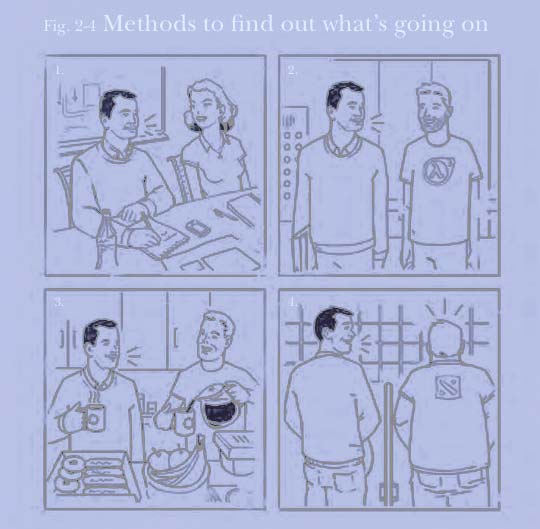
Valve's New Employee Guide: Methods to find out what's going on

Valve admits that one of its weaknesses is internal communication. So its new employee guide provides a helpful illustration of how to stay in the loop.

A copy of gaming company Valve’s new employee guide made the rounds on Hacker News this morning (read the discussion here). Of all such company-manifestos, Valve’s ranks as one of the most well-design, brightly-written, and astonishingly honest.

Google has its 20-percent-time policy, Valve’s is 100 percent:

We’ve heard that other companies have people allocate a percentage of their time to self-directed projects. At Valve, that percentage is 100.

Since Valve is flat, people don’t join projects because they’re told to. Instead, you’ll decide what to work on after asking yourself the right questions (more on that later). Employees vote on projects with their feet (or desk wheels).

Strong projects are ones in which people can
see demonstrated value; they staff up easily. This means there are any number of internal recruiting efforts constantly under way.

To be fair, Google’s policy ostensibly allows that 20 percent time to be directed at non-company-boosting projects. It’s likely there is some internal mechanism/dynamic that prevents Valve malcontents from going too far off the ranch.

With the attention that Valve puts into just their guide, they’re obviously betting that their hiring process finds the talent with the right attitude. They describe the model employee as being “T-shaped”: skilled in a broad variety of talents and peerless in their narrow discipline.

One of the best sections comes at the end, under the heading “What is Valve Not Good At?” This is the classic opportunity to do the humblebrag, as when it comes up during hiring interviews (“My greatest weakness is that I’m too passionate about my work!”). Valve’s list of weaknesses are not harsh or odious – if you like what they’ve opined in the guide, then these weaknesses logically follow:

  • Helping new people find their way. We wrote this book to help, but as we said above, a book can only go so far. [My reading between the lines: the people we seek to hire are intelligent and experienced enough to navigate unknown territory]
  • Mentoring people. Not just helping new people figure things out, but proactively helping people to grow in areas where they need help is something we’re organizationally not great at. Peer reviews help, but they can only go so far. [our “T” shaped employees were hired because they are good at a lot of things and especially good at one thing. Presumably, they have enough of a “big picture” mindset to realize how they became an expert in one area, why they chose to become good at it, what it takes to get there, and a reasonable judgment of cost versus benefit ]
  • Disseminating information internally [Since we’re a flat organization, it is incumbent on each team member to proactively keep themselves in the loop].
  • Finding and hiring people in completely new disciplines (e.g., economists! industrial designers!)[what can you say, we started out primarily as a gaming company and were so good at making games that we apparently could thrive on that alone].
  • Making predictions longer than a few months out [team members and group leaders don’t fill out enough TPS reports for us to keep reliable Gantt charts. Also, having set-in-stone deadlines and guidelines can restrict mobility].
  • We miss out on hiring talented people who prefer to work within a more traditional structure. Again, this comes with the territory and isn’t something we should change, but it’s worth recognizing as a self-imposed limitation.

All of Valve’s weaknesses can be spun positively, but they would legitimately be critical weaknesses in a company with a differing mindset. For anyone who has read through the entire guide, these bullet points are redundant. But it’s an excellent approach for doing a concluding summary/tl;dr version (in fact, it reminds me of the pre-mortem tactic: asking team members before a project’s launch to write a future-dated report describing why the project became a disaster. It reveals problems that should’ve been discovered during the project’s planning phases, but in a fashion that rewards employees for being critical, rather than seeing them as negative-nancies).

Read the Valvue guide here. And check out the Hacker News discussion which ponders how well this scales.

Dummy Data, Drugs, and Check-lists

Using dummy data — and forgetting to remove it — is a pretty common and unfortunate occurrence in software development…and in journalism (check out this headline). If you haven’t made yourself a pre-publish/produce checklist that covers even the most basic things (“do a full-text search for George Carlin’s seven dirty words“), now’s a good time to start.

These catastrophic mistakes can happen even when billions of dollars are on the line.

In his book, New Drugs: An Insider’s Guide to the FDA’s New Drug Approval Process, author Lawrence Friedhoff says he’s seen this kind of thing happen “many” times in the the drug research phase. He describes an incident in which his company was awaiting the statistical review of two major studies that would determine if a drug could move into the approval phase:

The computer programs to do the analysis were all written. To be sure that the programs worked properly, the statisticians had tested the programs by making up treatment assignments for each patient without regard to what the patients had actually received, and verifying that the programs worked properly with these “dummy” treatment codes.

The statisticians told us it would take about half an hour to do the analysis of each study and that they would be done sequentially. We waited in a conference room. The air was electric. Tens of millions of dollars of investment hung in the balance. The treatment options of millions of patients would or would not be expanded. Perhaps, billions of dollars of revenue and the future reputation of the development team would be made or lost based on the results of the statistical analyses.

The minutes ticked by. About 20 minutes after we authorized the code break, the door opened and the statisticians walked in. I knew immediately by the looks on their faces that the news was good…One down, one to go (since both studies had to be successful to support marketing approval).

The statisticians left the room to analyze the second study…which could still theoretically fail just by chance, so nothing was guaranteed. Finally, after 45 minutes, the door swung open, and the statisticians walked in. I could tell by the looks on their faces that there was a problem. They started presenting the results of the second study, trying to put a good face on a devastatingly bad outcome. The drug looked a little better than control here but worse there… I couldn’t believe it. How could one study have worked so well and the other be a complete disaster? The people in the room later told me I looked so horrified that they thought I would just have a heart attack and die on the spot.

The positive results of the first study were very strong, making it exceedingly unlikely that they occurred because of a mistake, and there was no scientific reason why the two studies should have given such disparate results.

After about a minute, I decided it was not possible for the studies to be so inconsistent, and that the statisticians must have made a mistake with the analysis of the second study…Ultimately they said they would check again, but I knew by their tone of voice that they viewed me with pity, a clinical development person who just couldn’t accept the reality of his failure.

An eternity later, the statisticians re-entered the room with hangdog looks on their faces. They had used the “dummy” treatment randomization for the analysis of the second study. The one they used had been made up to test the analysis programs, and had nothing to do with the actual treatments the patients had received during the study.

From: Friedhoff, Lawrence T. (2009-06-04). New Drugs: An Insider’s Guide to the FDA’s New Drug Approval Process for Scientists, Investors and Patients (Kindle Locations 2112-2118). PSPG Publishing. Kindle Edition.

So basically, Friedhoff’s team did the equivalent of what a newspaper does when laying out the page before the articles have been written: put in some filler text to be replaced later. Except that the filler text doesn’t get replaced at publication time…again, see this Romenesko link to see the disastrous/hilarious results.

Here’s an example of it happening in the tech startup world.

What’s interesting about Friedhoff’s case, though, is that validation of study results is a relatively rare – and expensive occurrence…whereas publishing a newspaper happens every day, as does pushing out code and test emails. But Friedhoff says the described incident is “only one of many similar ones I could write about”…which goes to show that rarity and magnitude of a task won’t stop you from making easy-to-prevent, yet devastating mistakes.

Relevant: Atul Gawande’s article about the check-list: how a simple list of five steps, as basic as “Wash your hands”, prevented thousands of surgical disasters.

ProPublica at Netexplo

A few weeks ago, I had the honor of joining my colleagues Charlie Ornstein and Tracy Weber in Paris to receive a Netexplo award for our work with Dollars for Docs. Check out the presentation video they prepared for the awards ceremony (held at UNESCO), featuring us as bobbleheads.

The easiest way to explain Netexplo is that one of the organizers told me that it hopes to be a South by Southwest of Paris. Check out the quirky trophy we got:

Netexplo trophy

Check out the other great entries in this year’s ceremony.

This was my first trip to Paris so of course I took photos like a shutterbug tourist. You can view them on my Flickr account:

Sony Alpha NEX-7: Paris - Eiffel Tower

Centre Pompidou, Musée National d'Art Moderne

Tuileries Garden

The Eiffel Tower, as seen from the Trocadéro.

Because of a typo, the government needs to keep your private data 10 times longer?

Yesterday the Obama administration approved new rules to greatly extend the time – from 180 days to 1,826 days (5 years) – that domestic intelligence services can retain American citizens’ private information. Citizens are eligible to be part of this federal data warehouse even when “there is no suspicion that they are tied to terrorism.”

As Charlie Savage in the New York Times reports:

Intelligence officials on Thursday said the new rules have been under development for about 18 months, and grew out of reviews launched after the failure to connect the dots about Umar Farouk Abdulmutallab, the “underwear bomber,” before his Dec. 25, 2009, attempt to bomb a Detroit-bound airliner.

After the failed attack, government agencies discovered they had intercepted communications by Al Qaeda in the Arabian Peninsula and received a report from a United States Consulate in Nigeria that could have identified the attacker, if the information had been compiled ahead of time.

The case of the “underwear bomber” is a strange justification for this expansion of data storage. Because the 2009 Christmas terror attempt nearly succeeded thanks to a series of what seems like common human errors, not from an information drought.

Shortly after the underwear bomber incident, the White House released a report examining how our vast intelligence network failed to prevent Abdulmutallab, the bomber, from boarding a flight from Amsterdam to Detroit.

One of the critical failures? Someone at the State Department, when sending information about Abdulmutallab to the National Counterterrorism Center, misspelled his name. Even though his father alerted American intelligence officials a full month before the attempted attack, our sophisticated surveillance system was partially stymied by a single misplaced letter.

As Foreign Policy reported in 2010:

State called an impromptu press briefing late Thursday evening to address the issue. The tone of the briefing was combative, as reporters pressed the “senior administration official” for details about the misspelling that he seemed not to want to give up. But here’s what we learned.

Someone (they won’t say who) at the State Department (presumably at the U.S. Embassy in Nigeria) did check to see if Abdulmutallab had a visa (they won’t say exactly when). That person was working off the Visas Viper cable originally sent from the embassy to the NCTC, which had the name wrong.

“There was a dropped letter in that — there was a misspelling,” the official said. “They checked the system. It didn’t come back positive. And so for a while, no one knew that this person had a visa.” (They won’t say for how long)

The chain of failures is more complicated than that, but the fact that a typo was a big enough of a wrench to warrant special mention in the White House review is an indication that the government’s surveillance systems, despite the work of its data architects, engineers and scientists, were compromised by some pretty banal problems, like not having spell-check capability.

In fact, the White House report goes out of its way to assert that the information-sharing problems that failed to prevent the 9/11 attacks “have now, 8 years later, largely been overcome.” Information about Abdulmutallab (again, his own father met with U.S. officials to warn them of his son a month ahead of the attack), his association with Al Qaeda, and Al Qaeda’s attack planning, “was available to all-source analysts at the CIA and the NCTC prior to the attempted attack.”

In other words, the 9/11 attack was possible because government agencies wouldn’t share information with each other. Now, they are happily sharing information with each other, they just aren’t diligently looking at it.

So the best solution is to enact a ten-fold increase the legal time limit for storing American citizens’ data?

It sounds like the government’s ability to detect terrorists would be greatly improved with better user-friendly software and adherence to data-handling standards. The ability to catch slight misspellings and do fuzzy data matches is something that Facebook and Google users have enjoyed for years; hell, the basic concept and consumer-friendly implementation has been around in Microsoft Word since about 20 years ago. Have software overhauls been enacted before deciding that the government needs more of its citizens’ private information? Or does the review of such technical details and policies seem too unsexy and pedantic for our intelligence bureaucracy?

The Times article also mentions that the guidelines call for more duplication of entire databases…which is a bit confusing. I’m assuming that this doesn’t refer to making backup copies (in case of a hard drive failure), but to a method of data-sharing between analysts. This is how the Times describes it:

The guidelines are also expected to result in the center making more copies of entire databases and “data mining them” using complex algorithms to search for patterns that could indicate a threat.

Hopefully, this doesn’t mean that database files are being copied and passed around so that each department can have their own copy of another department’s data. This would seem to introduce a few major logistical issues: namely, how do you know the copy you have contains the latest data? Remember that the typo in Abdulmutallab’s name was one mistake that helped spawn a series of snafus. Are we going to have an incident in which a terrorist slips through because an analyst forgot to update his/her copy of a database before mining it? Also, there’s the possibility that some of these data copies might end up lying around long after their 5-year limit.

There have been several reports of how intelligence agencies now suffer from too much data, to the point where analysts are “drowning in the data.” If this is a reason cited for how an attack went unprevented in the future, I hope the proposed reform is not “more data.”

Tools to get to the precipice of programming

I’m not a master programmer but it’s been so long since I’ve done my first “Hello World” that I don’t remember how people first grok the point of programming (for me, it was to get a good grade in programming class).

So when teaching non-programmers the value of code, I’m hoping there’s an even friendlier, shallower first step than the many zero-to-coder references out there, including Zed Shaw’s excellent Learn Code the Hard Way series.

Not only should this first step be “easy”, but nearly ubiquitous, free-to-use, and most importantly: has immediate benefit for both beginners and experts. The point here is not to teach coding, per se, but to get them to a precipice of great things. So that when they stand at the edge, they can at least see something to program towards, even if the end goal is simply labor-aversion, i.e. “I don’t want to copy-and-paste 100 web page tables by hand.”

Here are a few tools I’ve tried:

Inspecting a cat photo

1. Using the web inspector – I’ve never seen the point of taking an indepth HTML class (unless you want to become a full-time web designer/developer, and even then…) because so many non-techies even grasp that webpages are (largely) text, external multimedia assets (such as photos and videos), and the text that describes where those assets come from. To them, editing a webpage is as arcane as compiling a binary.

Nothing breaks that illusion better than the web inspector. Its basic element-inspector and network panel illustrates immediately the “magic” behind the web. As a bonus, with regular, casual use, the inspector can teach you the HTML and CSS vocabulary if you do intend to be a developer. It’s hard to think of another tool that is as ubiquitous and easy to use as the web inspector, yet as immensely useful to beginner and expert alike.

Its uses are immediate, especially for anyone who’s ever wanted to download a video from YouTube. To journalists, I’ve taught how this simple-to-use tool has helped me in my investigative reporting when I needed to find an XML file that was obfuscated through a Flash object.

In a hands-on class I taught, a student asked “So how do I get that XML into Excel?” – and that’s when you can begin to describe the joy of a basic for loop.

Here’s an overview of a hands-on web session I taught at NICAR12. Here’s the guide I wrote for my ProPublica project. And here’s the first of a multi-part introduction to the web inspector.

Refine WH Visitors

2. Google Refine – Refine is a spreadsheet-like software that allows you to easily explore and clean data: the most common example is resolving varied entries (“JOHN F KENNEDY”, “John F. Kennedy”, “Jack Kennedy”, “John Fitzgerald Kennedy”) into one (“John F. Kennedy”). Given that so many great investigative stories and data projects start with “How many times does this person’s name appear in this messy database?”, its uses are immediate and obvious.

Refine is an open-source tool that works out of the web browser and yet is such a powerful point-and-click interface that I’m happy to take my data out of my scripted workflow in order to use Refine’s features on it. Not only can you use regular expressions to help filter/clean your data, you can write full-on scripts, making Refine a pretty good environment to show some basic concepts of code (such as variables and functions).

I wrote a guide showing how Refine was essential for one of my investigative data projects. Refine’s official video tutorial is also a great place to start.

3. Regular Expressions – maybe it was because my own comsci curriculum skipped regexes, leaving me to figure out their worth much much later than I should have. But I really try to push learning regexes every time the following questions are asked:

  • In Excel, how do I split this “last_name, first_name middle_name” column into three different columns?
  • In Excel, how do I get all these date formats to be the same?
  • In Excel, how do I extract the zip code from this address field?

…and so on. The use of LEFT, TRIM, RIGHT, etc. functions seem to always be much more convoluted than the regex needed to do this kind of simple parsing. And while regexes aren’t the answer to every parsing problem, they sure deliver a lot of return for the investment (which can start from a simple cheat sheet next to your computer).

Regular-expressions.info has always been one of my favorite references. Zed Shaw is also writing a book on regexes. I’ve also written a lengthy tutorial on regexes.

So none of these tools or concepts involve programming…yet. But they’re immediately useful on their own, opening new doors to useful data just enough to interest beginners into going further. In that sense, I think these tools make for an inviting introduction towards learning programming.