Category Archives: works

actual works, projects

Ruby’s standard testing suite, MiniTest, is in dire need of a quick-and-handy reference for its syntax. I’ve put one together comparing the unit syntax (assert/refute) and the spec syntax (must/wont). You can see it below or download the Google Spreadsheet I made and roll your own sheet (HTML, XLS)

Test syntax

UnitSpecArgumentsExamples

assert_empty
refute_empty

must_be_empty
wont_be_empty

obj, msg=nil

assert_empty []
refute_empty [1,2,3]
[].must_be_empty
[1,2,3].wont_be_empty


assert_equal
refute_equal

must_equal
wont_equal

exp, act, msg=nil

assert_equal 2, 2
refute_equal 2,1
2.must_equal 2
2.wont_equal 1


assert_in_delta
refute_in_delta

must_be_within_delta
wont_be_within_delta

exp, act, dlt=0.001, msg=nil

assert_in_delta 2012, 2010, 2
refute_in_delta 2012, 3012, 2
2012.must_be_within_delta 2010, 2
2012.wont_be_within_delta 3012, 2


must_be_close_to
wont_be_close_to

act, dlt=0.001, msg=nil

2012.must_be_close_to 2010, 2
2012.wont_be_close_to 3012, 2


assert_in_epsilon
refute_in_epsilon

must_be_within_epsilon
wont_be_within_epsilon

a, b, eps=0.001, msg=nil

assert_in_epsilon 1.0, 1.02, 0.05
refute_in_epsilon 1.0, 1.06, 0.05
1.0.must_be_within_epsilon 1.02, 0.05
1.0.wont_be_within_epsilon 1.06, 0.05


assert_includes
refute_includes

must_include
wont_include

collection, obj, msg=nil

assert_includes [1, 2], 2
refute_includes [1, 2], 3
[1, 2].must_include 2
[1, 2].wont_include 3


assert_instance_of
refute_instance_of

must_be_instance_of
wont_be_instance_of

klass, obj, msg=nil

assert_instance_of String, "bar"
refute_instance_of String, 100
"bar".must_be_instance_of String
100.wont_be_instance_of String


assert_kind_of
refute_kind_of

must_be_kind_of
wont_be_kind_of

klass, obj, msg=nil

assert_kind_of Numeric, 100
refute_kind_of Numeric, "bar"
100.must_be_kind_of Numeric
"bar".wont_be_kind_of Numeric


assert_match
refute_match

must_match
wont_match

exp, act, msg=nil

assert_match /\d/, "42"
refute_match /\d/, "foo"
"42".must_match /\d/
"foo".wont_match /\d/


assert_nil
refute_nil

must_be_nil
wont_be_nil

obj, msg=nil

assert_nil [].first
refute_nil [1].first
[].first.must_be_nil
[1].first.wont_be_nil


assert_operator
refute_operator

must_be
wont_be

o1, op, o2, msg=nil

assert_operator 1, :<, 2
refute_operator 1, :>, 2
1.must_be :<, 2
1.wont_be :>, 2


assert_output

must_output

stdout = nil, stderr = nil

assert_output("hi\n"){ puts "hi" }
Proc.new{puts "hi"}.must_output "hi\n"


assert_raises

must_raise

*exp

assert_raises(NoMethodError){ nil! }
Proc.new{nil!}.must_raise NoMethodError


assert_respond_to
refute_respond_to

must_respond_to
wont_respond_to

obj, meth, msg=nil

assert_respond_to "foo",:empty?
refute_respond_to 100, :empty?
"foo".must_respond_to :empty?
100.wont_respond_to :empty?


assert_same
refute_same

must_be_same_as
wont_be_same_as

exp, act, msg=nil

assert_same :foo, :foo
refute_same ['foo'], ['foo']
:foo.must_be_same_as :foo
['foo'].wont_be_same_as ['foo']


assert_silent

must_be_silent

-

assert_silent{ 1 + 1 }
Proc.new{ 1 + 1}.must_be_silent


assert_throws

must_throw

sym, msg=nil

assert_throws(:up){ throw :up}
Proc.new{throw :up}.must_throw :up

Test Setup

UnitSpec
setup()before(type = nil, &block)
teardown()after(type = nil, &block)

Mocks

via MiniTest::Mock

  • expect(name, retval, args=[]) – Expect that method name is called, optionally with args or a blk, and returns retval.

    Example:

    @mock.expect(:meaning_of_life, 42)
    @mock.meaning_of_life # => 42
    
    @mock.expect(:do_something_with, true, [some_obj, true])
    @mock.do_something_with(some_obj, true) # => true
    
    @mock.expect(:do_something_else, true) do |a1, a2|
       a1 == "buggs" && a2 == :bunny
    end
    
  • verify – Verify that all methods were called as expected. Raises MockExpectationError if the mock object was not called as expected.

Other syntax

  • def flunk(msg=nil)
  • def pass(msg=nil)
  • def skip(msg=nil, bt=caller)
  • def it (desc="anonymous", &block)
  • i_suck_and_my_tests_are_order_dependent!() – Call this at the top of your tests when you absolutely positively need to have ordered tests. In doing so, you’re admitting that you suck and your tests are weak. (TestCase public class method)
  • parallelize_me!() – Call this at the top of your tests when you want to run your tests in parallel. In doing so, you’re admitting that you rule and your tests are awesome.
  • make_my_diffs_pretty!() – Make diffs for this TestCase use pretty_inspect so that diff in assert_equal can be more details. NOTE: this is much slower than the regular inspect but much more usable for complex objects.

Tutorials

Reference

Well, I’m not quite done with my promised revision of the Bastards Book of Ruby. Or of Photography…but I’ve decided, oh what the hell, I should write something about regular expressions.

Actually, there is some method to this madness. As part of the process of updating the Ruby book, I realized I needed to spin off some of the larger, non-Ruby related topics. So, at some point, there will be mini-books about HTML and SQL. Regular expressions, as I keep telling people who want to deal with data, are incredibly important, even if you think you never want to learn programming. Hopefully this mini-book will make a strong case for learning regexes.

The second motive is I’ve been looking for a html/text-to-pdf workflow. So this is my experiment with Leanpub, which promises to turn a set of Markdown files into PDF/mobi/etc, while handling the selling process. I don’t expect to sell any copies of the BBoRegexes, but I hope to get a lot of insight about the mechanics behind Leanpub and if it presents a viable way for me to publish my other projects.

Check out the Leanpub homepage for my tentatively tiled book, The Bastards Book of Regular Expressions. Or, you could just read the mega-chapter on regexes in my Ruby book.

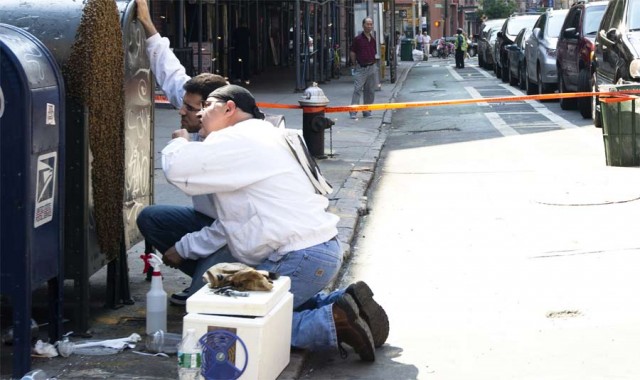
The majority of this photo’s Flickr pageviews comes from the Meet Your Web Inspector chapter, probably from readers who click the photo to see what exactly the hell is going on. Here’s the story: One day, a queen bee decided to take residence on a Chinatown mailbox. Her hive decided to follow her, causing the city to block off the corner so the bee inspectors could pluck her out. My friend from China who was visiting NYC for the first time said to me later that this was the most exciting thing she saw in New York all week. Coincidentally, the web inspector chapter is probably the most useful part (for beginners) of my programming book.

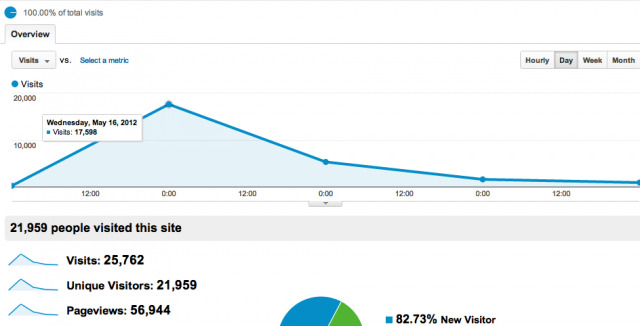
Last year, I wanted programming to be more accessible. So I published a rough draft of what I called the “Bastards Book of Ruby” and then never added to it again. It’s interesting to see how much actual traction it got. Here’s a screenshot of the Google Analytics visitors overview:
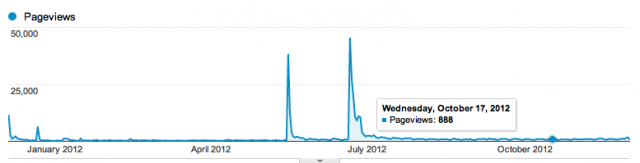
Google Analytics Pageviews for bastardsbook.com
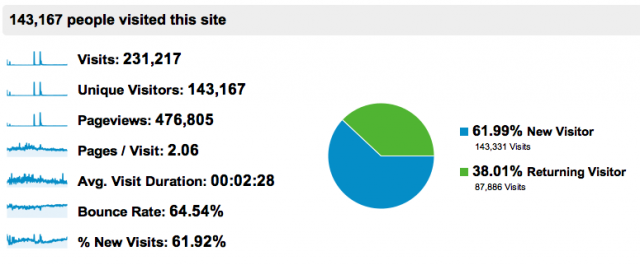
Caveat: Unfortunately, I never figured out how to get Google Analytics to do multiple subdomains, so this report includes the July traffic boost from the Bastards Book of Photography, which, day-to-day, is not as popular as the Ruby book.

In absolute terms, fewer than half a million pageviews in a year is not impressive for a free website (this 2 min. video I took of some guys playing Super Mario Brothers in the subway is already at 250K visits). But given that it’s a book about programming and that each single page consists of a “chapter” and is – in retrospect – way too long (the Ruby book is about 75,000 words altogether), I’ll pretend that they’re more “substantial” page views. At least a few visitors saved pages for offline viewing and really, after you’ve gone through the chapters you care about, there’s not much reason to return to the book since I never really updated it.

However, according to the % New Visits metric, there’s been a steady increase in percentage of new visitors:
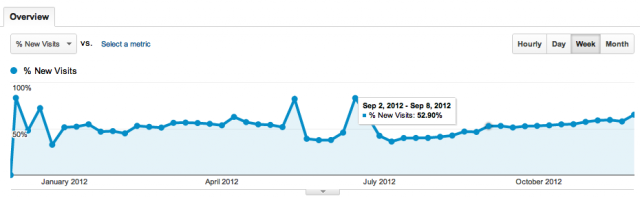
New visits to bastardsbook.com

Google Analytics % of new visits to bastardsbook.com

Some traffic high points:

  • 12/5/2011 – Bastards Book of Ruby is released. It made it to Hacker News’s front page: 11,566 pageviews
  • 12/22/2011 – Once in awhile, either me or someone else would submit individual chapters to various sites. The chapter I had about scraping the Putnam County Sheriff’s Office got a few upvotes on HN: 6,528 pageviews
  • 5/16/2012 – The Ruby book makes it to the top of HN, possibly in response to Jeff Atwood’s “Please Don’t Learn to Code” published the day before: 38,359 pageviews
  • 6/21/2012The Bastards Book of Photography is published. It took me about two weeks to put together and I wanted to try out Octopress as a CMS to replace the hack Rails-to-static-file system I wrote for the Ruby book. It made the front of HN as well as Reddit’s photography and howto subreddits: 45,519

In the last few months, the average number of visitors per week ranges from 3,000 to 4,000 visitors.

Promotional work and referrals

The BBoR was aimed toward journalism professionals trying to learn coding but didn’t formally pitch it outside of Twitter, listing it on my online bios and mentioning it on the NICAR mailing list. Other hacker journalists were kind enough to give it a few shout-outs.

Most of the referrals overall came from technical audiences such as Hacker News and Reddit’s technical subreddits (again, the photo book numbers are mixed in here, which I think accounts for most of the social media traffic):

  1. news.ycombinator.com 38,817
  2. reddit.com 16,297
  3. t.co 7,062
  4. petapixel.com 6,372
  5. facebook.com 4,630
  6. danwin.com 3,704
  7. google.com 2,540
  8. citizen428.net 2,476
  9. news.ycombinator.org 1,348
  10. wired.com 1,015

The most-read topics

The most popular section of the Ruby book is the five-chapter-series I wrote on web scraping, which is of particular interest to journalists dealing with cruddy government websites that will never have an API. The Parsing HTML with Nokogiri is the most popular individual chapter.

In my own cookie-wiped Google Search, the book is the top result for “ruby web scraping”.

Here are the top 20 search terms that don’t include the word “bastard”. Apparently the Bastards Book doesn’t rank high at all for any photography search terms:

  1. alter positions in a list ruby
  2. ruby io safe io video stream
  3. parse image path with ruby
  4. putnam county jail log
  5. ruby mechanize
  6. nokogiri
  7. ruby web crawler
  8. `
  9. ruby if else
  10. web scraping ruby
  11. finding curly bracket special characters in excel
  12. ruby nokogiri
  13. ruby collections
  14. ruby parse html
  15. ruby web scraping
  16. text editor using wrong version of ruby
  17. nokogiri book
  18. ruby open html
  19. how to run a saved program in ruby
  20. ruby inline if
The respective covers of the books.

The respective covers of the books.

General interest in programming

Besides fixing typos and errors, I never did fulfill the promise of making major updates (to either of the books) this year and I’ve rarely mentioned the book after its first month – except in discussions about journalism and programming, which are pretty rare in general. To my surprise though, daily traffic has been generally steady. As I mentioned earlier, the two books receive about 3 to 4 thousand visitors weekly. When the Ruby book peaked on Hacker News in May, the average jumped from 1,500 visitors to 2,500 visitors. The current average has been the status quo since the photo book was released in July.

It would seem that the photo book accounts for the majority of the difference. But anecdotally, I get thank-you emails and tweets every week about the Ruby book and almost never hear feedback on the photo book. Sure, there are plenty of in-depth photography guides in comparison to programming books. But there’s far fewer aspiring programmers than photographers.

I hope to help change that and so have been working on a major update to the BBoR (including converting it to PDF form, probably the most requested feature). Earlier than later, hopefully, and as my off-work hours permit.

Sometime after March 2011 was when I started thinking about writing a programming book. This was after I had tried teaching the first learn-to-code class at General Assembly, an 8PM Thursday class called: “Coding for Beginners: Data Mashing with APIs”. Here’s the description I wrote up for the class:

Students will learn the fundamentals of programming by creating simple yet powerful scripts to collect and organize the data found in Web services such as Twitter, Google Maps, and Foursquare. The class will walk through sample Ruby code to understand the basic theory of programming, including variables, methods, arrays and loops. At the end, students will be able to write a fully-functional custom script to access and scrape website data.

This class is intended for absolute newbies and those beginning to learn how to code. Laptops are optional. Code for the lesson will be provided so that students can follow along during class and after. Prerequisites: None.

(Before you spit out your coffee, I do reflect below about how hilariously absurd this synopsis is, in retrospect)

Jenny 8. Lee at Hacks/Hackers) introduced me to GA but I remember the GA coordinator and I both thinking, “Who the hell actually wants to learn basic programming?” I don’t know what the average price for a GA class was then. But I know when we set the price at $30 for a 2-3 hour class, I thought it was too high and we’d end up with a pretty bare turnout.

And I was wrong: it was the fastest-selling class in GA’s then-young history and sold out in a day. And thankfully, the interest doesn’t seem to be a fluke: GA today regularly holds beginners’ programming classes, ranging from price of $175 for an afternoon to $3,000 for an eight-week Rails course (including Ruby fundamentals).

My own class didn’t go terribly well because, as I’ve found out since then, it’s kind of difficult to cover in 3 hours the programming fundamentals (variables/methods/if statements/for-loops in order to create a mashup from Twitter and Foursquare APIs) that it takes real teachers a semester to cover, especially to an audience mostly unfamiliar with the command line.

So the Ruby book was an attempt to create a resource that might actually be helpful for aspiring coders. Less than half a million pageviews might not much. But it’s been gratifying to see the Ruby book continue to be used even in its messy draft form by beginners who are incredibly committed to learning new things in life. I hope the next revision of the Ruby book will be even more useful to them.

Other resources: Who knows when I’ll actually finish. In the meantime, a lot of great programming resources have come out this past year, too many to list so I’ll just point out the Ruby ones. Free resources include Zed Shaw’s Ruby version of his Learn to Code the Hard Way and Codecademy’s Ruby track. Sau Sheong Chang’s Exploring Everyday Things with R and Ruby is one of my favorite books I’ve bought this year and it follows a philosophy similar to mine: use code to do creative, real-world problem solving.
MDBLite on the Mac App Store

A life-changing app for data enthusiasts.

Update Travis Swicegood, of the Texas Tribune, pointed out that mdbtools has a homebrew recipe (brew install mdbtools), which avoids this thorny problem. While waiting for the homebrew recipe to install, though, I found this mdb-sqlite project, which uses the Java library Jackcess, to allow command-line conversion…which is lacking in the solution I originally posted below. Still, it was the most productive $1.99 I’ve spent in a while.

MDBLite, $1.99 in the Mac App Store, allows you to convert Microsoft Access mdb files into SQL, CSV, or SQLite databases.

For the past few years, I’ve kept an old Windows XP laptop around just to open Access databases to convert them to Excel or CSV. I only found out about MDBLite after digging through some obscure discussion groups that mentioned in passing. The entire purpose of this blog post is to inform all other poor souls who use Macs but must still deal with government data. If that is the most important thing my blog provides for the Internet, I’d still be proud.

So far, it works as well as advertised. Which is pretty amazing if you’ve ever had to deal with Access conversions.

Bastards Book HN spike

The Hacker News traffic spike for the Bastards Book of Ruby

I’ve procrastinated in updating my book of practical Ruby coding. But the site got an unexpected boost in interest and traffic when someone posted it to Hacker News this past week, possibly in response to the “Please Don’t Learn to Code” debate started by Jeff Atwood.

Sidenote: The Bastards Book did reach the front page when I submitted its introductory essay, aptly titled “Programming is for Anyone.” That sprawling essay needs to be revised but I believe it in even more.

The HN posting reached the top, something I couldn’t get it to do back when I originally posted the draft. It was encouraging to see the need for something like this out there and makes me want to jump back into this as a summer project. I’ve definitely thought of many more examples to include and have hopefully become a better writer.

The main “fix” will be moving it from my totally-overkill Ruby-on-Rails system, structuring the book’s handmade HTML code into something simple enough for Markdown, and pushing it to Github. I’ve since gotten familiar with Jekyll, which is mostly painless with the jekyll-bootstrap gem.

The Tesseract OCR Chopper, by data journalist Dino Beslagic.

I’m making this short stub post because ever since I’ve used tesseract to convert scanned documents into text, I’ve wondered why the hell is it so hard to train tesseract (to make it better at recognizing a font)? As it turns out, Beslagic created a web-app that makes the task comparatively easy and platform-independent.

He recently updated it but posted it about 2 years ago. I can’t believe I didn’t find it until now. How did I find it? By stumbling upon the “AddOns” wiki for the Tesseract project. I love Tesseract but am surprised at how such a useful and popular utility can have such scattered resources.

I’m not a master programmer but it’s been so long since I’ve done my first “Hello World” that I don’t remember how people first grok the point of programming (for me, it was to get a good grade in programming class).

So when teaching non-programmers the value of code, I’m hoping there’s an even friendlier, shallower first step than the many zero-to-coder references out there, including Zed Shaw’s excellent Learn Code the Hard Way series.

Not only should this first step be “easy”, but nearly ubiquitous, free-to-use, and most importantly: has immediate benefit for both beginners and experts. The point here is not to teach coding, per se, but to get them to a precipice of great things. So that when they stand at the edge, they can at least see something to program towards, even if the end goal is simply labor-aversion, i.e. “I don’t want to copy-and-paste 100 web page tables by hand.”

Here are a few tools I’ve tried:

Inspecting a cat photo

1. Using the web inspector – I’ve never seen the point of taking an indepth HTML class (unless you want to become a full-time web designer/developer, and even then…) because so many non-techies even grasp that webpages are (largely) text, external multimedia assets (such as photos and videos), and the text that describes where those assets come from. To them, editing a webpage is as arcane as compiling a binary.

Nothing breaks that illusion better than the web inspector. Its basic element-inspector and network panel illustrates immediately the “magic” behind the web. As a bonus, with regular, casual use, the inspector can teach you the HTML and CSS vocabulary if you do intend to be a developer. It’s hard to think of another tool that is as ubiquitous and easy to use as the web inspector, yet as immensely useful to beginner and expert alike.

Its uses are immediate, especially for anyone who’s ever wanted to download a video from YouTube. To journalists, I’ve taught how this simple-to-use tool has helped me in my investigative reporting when I needed to find an XML file that was obfuscated through a Flash object.

In a hands-on class I taught, a student asked “So how do I get that XML into Excel?” – and that’s when you can begin to describe the joy of a basic for loop.

Here’s an overview of a hands-on web session I taught at NICAR12. Here’s the guide I wrote for my ProPublica project. And here’s the first of a multi-part introduction to the web inspector.

Refine WH Visitors

2. Google Refine – Refine is a spreadsheet-like software that allows you to easily explore and clean data: the most common example is resolving varied entries (“JOHN F KENNEDY”, “John F. Kennedy”, “Jack Kennedy”, “John Fitzgerald Kennedy”) into one (“John F. Kennedy”). Given that so many great investigative stories and data projects start with “How many times does this person’s name appear in this messy database?”, its uses are immediate and obvious.

Refine is an open-source tool that works out of the web browser and yet is such a powerful point-and-click interface that I’m happy to take my data out of my scripted workflow in order to use Refine’s features on it. Not only can you use regular expressions to help filter/clean your data, you can write full-on scripts, making Refine a pretty good environment to show some basic concepts of code (such as variables and functions).

I wrote a guide showing how Refine was essential for one of my investigative data projects. Refine’s official video tutorial is also a great place to start.

3. Regular Expressions – maybe it was because my own comsci curriculum skipped regexes, leaving me to figure out their worth much much later than I should have. But I really try to push learning regexes every time the following questions are asked:

  • In Excel, how do I split this “last_name, first_name middle_name” column into three different columns?
  • In Excel, how do I get all these date formats to be the same?
  • In Excel, how do I extract the zip code from this address field?

…and so on. The use of LEFT, TRIM, RIGHT, etc. functions seem to always be much more convoluted than the regex needed to do this kind of simple parsing. And while regexes aren’t the answer to every parsing problem, they sure deliver a lot of return for the investment (which can start from a simple cheat sheet next to your computer).

Regular-expressions.info has always been one of my favorite references. Zed Shaw is also writing a book on regexes. I’ve also written a lengthy tutorial on regexes.

So none of these tools or concepts involve programming…yet. But they’re immediately useful on their own, opening new doors to useful data just enough to interest beginners into going further. In that sense, I think these tools make for an inviting introduction towards learning programming.

Big Faces

Just put up another quick side project: Big Faces, which aggregates the excellent Big Picture Blog (by the Boston Globe and its many contributors) and just shows the faces. I used the Face.com API to crop the faces before uploading them.

I have in mind a multi-level photo-exploration app but because it’s been so long since I looked at using Backbone.js, I needed some practice. As it is, the fine work of the photographers and curators associated with The Big Picture stands on its own power. I probably should rethink it so it doesn’t require a 700K JSON download…

The process is simliar to the Congressmiles demo I did last week.

On the front end, this uses the excellent isotope JQuery plugin. It also has Backbone.js though I vastly simplified the project so much that I pretty much ditched using any of Backbone’s useful features. The Backbone boilerplate was extremely helpful, though, in organizing the project.

U.S. Senate Smiles, ranked by Face.com face-detection algorithm

The smiles of your U.S. Senate from most smiley-est to least, according to Face.com's algorithm

Who’s got the biggest smile among our U.S. senators? Let’s find out and exercise our Ruby coding and civic skills. This article consists of a quick coding strategy overview (from the full code is at my Github). Or jump here to see the results, as sorted by Face’s algorithm.

About this tutorial

This is a Ruby coding lesson to demonstrate the basic features of Face.com’s face-detection API for a superficial use case. We’ll mash with the New York Times Congress API and data from the Sunlight Foundation.

The code comprehension is at a relatively simple level and is intended for learning programmers who are comfortable with RubyGems, hashes, loops and variables.

If you’re a non-programmer: The use case may be a bit silly here but I hope you can view it from an abstract-big-picture level and see the use of programming to: 1) Make quick work of menial work and 2) create and analyze datapoints where none existed before.

On to the lesson!

The problem with portraits

For the SOPA Opera app I built a few weeks ago, I wanted to use the Congressional mugshots to illustrate
the front page. The Sunlight Foundation provides a convenient zip file download of every sitting Congressmember’s face. The problem is that the portraits were a bit inconsistent in composition (and quality). For example, here’s a usable, classic head-and-shoulders portrait of Senator Rand Paul:

Sen. Rand Paul

But some of the portraits don’t have quite that face-to-photo ratio; Here’s Sen. Jeanne Shaheen’s portrait:

Sen. Jeanne Shaheen

It’s not a terrible Congressional portrait. It’s just out of proportion compared to Sen. Paul’s. What we need is a closeup crop of Sen. Shaheen’s face:

Sen. Jeanne Shaheen's face cropped

How do we do that for a given set of dozens (even hundreds) of portraits that doesn’t involve manually opening each image and cropping the heads in a non-carpal-tunnel-syndrome-inducing manner?

Easy face detection with Face.com’s Developer API

Face-detection is done using an algorithm that scans an image and looks for shapes proportional to the average human face and containing such inner shapes as eyes, a nose and mouth in the expected places. It’s not as if the algorithm has to have an idea of what an eye looks like exactly; two light-ish shapes about halfway down what looks like a head might be good enough.

You could write your own image-analyzer to do this, but we just want to crop faces right now. Luckily, Face.com provides a generous API that when you send it an image, it will send you back a JSON file in this format:

{
    "photos": [{
        "url": "http:\/\/face.com\/images\/ph\/12f6926d3e909b88294ceade2b668bf5.jpg",
        "pid": "F@e9a7cd9f2a52954b84ab24beace23046_1243fff1a01078f7c339ce8c1eecba44",
        "width": 200,
        "height": 250,
        "tags": [{
            "tid": "TEMP_F@e9a7cd9f2a52954b84ab24beace23046_1243fff1a01078f7c339ce8c1eecba44_46.00_52.40_0_0",
            "recognizable": true,
            "threshold": null,
            "uids": [],
            "gid": null,
            "label": "",
            "confirmed": false,
            "manual": false,
            "tagger_id": null,
            "width": 43,
            "height": 34.4,
            "center": {
                "x": 46,
                "y": 52.4
            },
            "eye_left": {
                "x": 35.66,
                "y": 44.91
            },
            "eye_right": {
                "x": 58.65,
                "y": 43.77
            },
            "mouth_left": {
                "x": 37.76,
                "y": 61.83
            },
            "mouth_center": {
                "x": 49.35,
                "y": 62.79
            },
            "mouth_right": {
                "x": 57.69,
                "y": 59.75
            },
            "nose": {
                "x": 51.58,
                "y": 56.15
            },
            "ear_left": null,
            "ear_right": null,
            "chin": null,
            "yaw": 22.37,
            "roll": -3.55,
            "pitch": -8.23,
            "attributes": {
                "glasses": {
                    "value": "false",
                    "confidence": 16
                },
                "smiling": {
                    "value": "true",
                    "confidence": 92
                },
                "face": {
                    "value": "true",
                    "confidence": 79
                },
                "gender": {
                    "value": "male",
                    "confidence": 50
                },
                "mood": {
                    "value": "happy",
                    "confidence": 75
                },
                "lips": {
                    "value": "parted",
                    "confidence": 39
                }
            }
        }]
    }],
    "status": "success",
    "usage": {
        "used": 42,
        "remaining": 4958,
        "limit": 5000,
        "reset_time_text": "Tue, 24 Jan 2012 05:23:21 +0000",
        "reset_time": 1327382601
    }
}		
	

The JSON includes an array of photos (if you sent more than one to be analyzed) and then an array of tags – one tag for each detected face. The important part for cropping purposes are the attributes dealing with height, width, and center:

		"width": 43,
      "height": 34.4,
      "center": {
          "x": 46,
          "y": 52.4
      },	
	

These numbers represent percentage values from 0-100. So the width of the face is 43% of the image’s total width. If the image is 200 pixels wide, then the face spans 86 pixels.

Using your favorite HTTP-calling library (I like the RestClient gem), you can simply ping the Face.com API’s detect feature to get these coordinates for any image you please.

Image manipulation with RMagick

So how do we do the actual cropping? By using the RMagick (a Ruby wrapper for the ImageMagick graphics library) gem, which lets us do crops with commands as simple as these:

img = Magick::Image.read("somefile.jpg")[0]

# crop a 100x100 image starting from the top left corner
img = img.crop(0,0,100,100) 

The RMagick documentation page is a great place to start. I’ve also written an image-manipulation chapter for The Bastards Book of Ruby.

The Process

The code for all of this is stored at my Github account.

I’ve divided this into two parts/scripts. You could combine it into one script but to make things easier to comprehend (and to lessen the amount of best-practices error-handling code for me to write), I divide it into a “fetch” and “process” stage.

In the fetch.rb stage, we essentially download all the remote files we need to do our work:

  • Download a zip file of images from Sunlight Labs and unzip it at the command line
  • Use NYT’s Congress API to get latest list of Senators
  • Use Face.com API to download face-coordinates as JSON files

In the process.rb stage, we use RMagick to crop the photos based from the metadata we downloaded from the NYT and Face.com. As a bonus, I’ve thrown in a script to programmatically create a crude webpage that ranks the Congressmembers’ faces by smile, glasses-wearingness, and androgenicity. How do I do this? The Face.com API handily provides these numbers in its response:

	"attributes": {
            "glasses": {
                "value": "false",
                "confidence": 16
            },
            "smiling": {
                "value": "true",
                "confidence": 92
            },
            "face": {
                "value": "true",
                "confidence": 79
            },
            "gender": {
                "value": "male",
                "confidence": 50
            },
            "mood": {
                "value": "happy",
                "confidence": 75
            },
            "lips": {
                "value": "parted",
                "confidence": 39
            }
        }
	

I’m not going to reprint the code from my Github account, you can see the scripts yourself there:

https://github.com/dannguyen/Congressmiles

First things first: sign up for API keys at the NYT and Face.com

I also use the following gems:

The Results

Here’s what you should see after you run the process.rb script (all judgments made by Face.com’s algorithm…I don’t think everyone will agree with about the quality of the smiles):


10 Biggest Smiles

Sen. Wicker (R-MS)
Sen. Wicker (R-MS) [100]
Sen. Reid (D-NV)
Sen. Reid (D-NV) [100]
Sen. Shaheen (D-NH)
Sen. Shaheen (D-NH) [99]
Sen. Hagan (D-NC)
Sen. Hagan (D-NC) [99]
Sen. Snowe (R-ME)
Sen. Snowe (R-ME) [98]
Sen. Kyl (R-AZ)
Sen. Kyl (R-AZ) [98]
Sen. Klobuchar (D-MN)
Sen. Klobuchar (D-MN) [98]
Sen. Crapo (R-ID)
Sen. Crapo (R-ID) [98]
Sen. Johanns (R-NE)
Sen. Johanns (R-NE) [98]
Sen. Hutchison (R-TX)
Sen. Hutchison (R-TX) [98]


10 Most Ambiguous Smiles

Sen. Inouye (D-HI)
Sen. Inouye (D-HI) [40]
Sen. Kohl (D-WI)
Sen. Kohl (D-WI) [43]
Sen. McCain (R-AZ)
Sen. McCain (R-AZ) [47]
Sen. Durbin (D-IL)
Sen. Durbin (D-IL) [49]
Sen. Roberts (R-KS)
Sen. Roberts (R-KS) [50]
Sen. Whitehouse (D-RI)
Sen. Whitehouse (D-RI) [52]
Sen. Hoeven (R-ND)
Sen. Hoeven (R-ND) [54]
Sen. Alexander (R-TN)
Sen. Alexander (R-TN) [54]
Sen. Shelby (R-AL)
Sen. Shelby (R-AL) [62]
Sen. Johnson (D-SD)
Sen. Johnson (D-SD) [63]

The Non-Smilers

Sen. Bingaman (D-NM)
Sen. Bingaman (D-NM) [79]
Sen. Coons (D-DE)
Sen. Coons (D-DE) [77]
Sen. Burr (R-NC)
Sen. Burr (R-NC) [72]
Sen. Hatch (R-UT)
Sen. Hatch (R-UT) [72]
Sen. Reed (D-RI)
Sen. Reed (D-RI) [71]
Sen. Paul (R-KY)
Sen. Paul (R-KY) [71]
Sen. Lieberman (I-CT)
Sen. Lieberman (I-CT) [59]
Sen. Bennet (D-CO)
Sen. Bennet (D-CO) [55]
Sen. Udall (D-NM)
Sen. Udall (D-NM) [51]
Sen. Levin (D-MI)
Sen. Levin (D-MI) [50]
Sen. Boozman (R-AR)
Sen. Boozman (R-AR) [48]
Sen. Isakson (R-GA)
Sen. Isakson (R-GA) [41]
Sen. Franken (D-MN)
Sen. Franken (D-MN) [37]


10 Most Bespectacled Senators

Sen. Franken (D-MN)
Sen. Franken (D-MN) [99]
Sen. Sanders (I-VT)
Sen. Sanders (I-VT) [98]
Sen. McConnell (R-KY)
Sen. McConnell (R-KY) [98]
Sen. Grassley (R-IA)
Sen. Grassley (R-IA) [96]
Sen. Coburn (R-OK)
Sen. Coburn (R-OK) [93]
Sen. Mikulski (D-MD)
Sen. Mikulski (D-MD) [93]
Sen. Roberts (R-KS)
Sen. Roberts (R-KS) [93]
Sen. Inouye (D-HI)
Sen. Inouye (D-HI) [91]
Sen. Akaka (D-HI)
Sen. Akaka (D-HI) [88]
Sen. Conrad (D-ND)
Sen. Conrad (D-ND) [86]


10 Most Masculine-Featured Senators

Sen. Bingaman (D-NM)
Sen. Bingaman (D-NM) [94]
Sen. Boozman (R-AR)
Sen. Boozman (R-AR) [92]
Sen. Bennet (D-CO)
Sen. Bennet (D-CO) [92]
Sen. McConnell (R-KY)
Sen. McConnell (R-KY) [91]
Sen. Nelson (D-FL)
Sen. Nelson (D-FL) [91]
Sen. Rockefeller IV (D-WV)
Sen. Rockefeller IV (D-WV) [90]
Sen. Carper (D-DE)
Sen. Carper (D-DE) [90]
Sen. Casey (D-PA)
Sen. Casey (D-PA) [90]
Sen. Blunt (R-MO)
Sen. Blunt (R-MO) [89]
Sen. Toomey (R-PA)
Sen. Toomey (R-PA) [88]


10 Most Feminine-Featured Senators

Sen. McCaskill (D-MO)
Sen. McCaskill (D-MO) [95]
Sen. Boxer (D-CA)
Sen. Boxer (D-CA) [93]
Sen. Shaheen (D-NH)
Sen. Shaheen (D-NH) [93]
Sen. Gillibrand (D-NY)
Sen. Gillibrand (D-NY) [92]
Sen. Hutchison (R-TX)
Sen. Hutchison (R-TX) [91]
Sen. Collins (R-ME)
Sen. Collins (R-ME) [90]
Sen. Stabenow (D-MI)
Sen. Stabenow (D-MI) [86]
Sen. Hagan (D-NC)
Sen. Hagan (D-NC) [81]
Sen. Ayotte (R-NH)
Sen. Ayotte (R-NH) [79]
Sen. Klobuchar (D-MN)
Sen. Klobuchar (D-MN) [79]

For the partisan data-geeks, here’s some faux analysis with averages:

PartySmilesNon-smilesAvg. Smile Confidence
D44785
R42586
I1185

There you have it, the Republicans are the smiley-est party of them all.

Further discussion

This is an exercise to show off the very cool Face.com API and to demonstrate the value of a little programming knowledge. Writing the script doesn’t take too long, though I spent more time than I liked on idiotic bugs of my own making. But this was way preferable than cropping photos by hand. And once I had the gist of things, I not only had a set of cropped files, I had the ability to whip up any kind of visualization I needed with just a minute’s more work.

And it wasn’t just face-detection that I was using, but face-detection in combination with deep data-sources like the Times’s Congress API and the Sunlight Foundation. For the SOPA Opera app, it didn’t take long at all to populate the site with legislator data and faces. (I didn’t get around to using this face-detection technique to clean up the images, but hey, I get lazy too…)

Please don’t judge the value of programming by my silly example here – having an easy-to-use service like Face.com API (mind the usage terms, of course) gives you a lot of great possibilities if you’re creative. Off the top of my head, I can think of a few:

  • As a photographer, I’ve accumulated thousands of photos but have been quite lazy in tagging them. I could conceivably use Face.com’s API to quickly find photos without faces for stock photo purposes. Or maybe a client needs to see male/female portraits. The Face.com API gives me an ad-hoc way to retrieve those without menial browsing.
  • Data on government hearing webcasts are hard to come by. I’m sure there’s a programmatic way to split up a video into thousands of frames. Want to know at which points Sen. Harry Reid shows up? Train Face.com’s API to recognize his face and set it loose on those still frames to find when he speaks.
  • Speaking of breaking up video…use the Face API to detect the eyes of someone being interviewed and use RMagick to detect when the eyes are closed (the pixels in those positions are different in color than the second before) to do that college-level psych experiment of correlating blinks-per-minute to truthiness.

Thanks for reading. This was a quick post and I’ll probably go back to clean it up. At some point, I’ll probably add this to the Bastards Book.

Snowball fight in Times Square, Manhattan, New York

Update: This post rambled longer than I intended it to and I forgot that I had meant to include some observations on what I’ve noticed about Flickr’s traffic pattern. I’ve added some grafs to the bottom of this post.

My Flickr account hit 1,000,000 pageviews this weekend. Two years ago, I bought a Pro account shortly after the above photo of some punk kid throwing a snowball at me in Times Square was posted on Flickr’s blog. Since then I set my account to share all of my photos under the Creative Commons Non-commercial license (but I’ve let anyone who asks use them for free).

My account was on track to have 500K pageviews by October (of this past year) but then this photo of pilots marching on Wall Street hit Reddit and attracted 150K views all by itself, so then a million total views seemed just around the corner :) .

Net Profit

Mermaid Parade 2010, Coney Island

I was paid $120 for this photo, which was used in New York’s campaign to remind people that they can’t smoke in Coney Island (or any other public park).


So how much have I gained monetarily in these two years of paying for a Flickr Pro account?

Two publications offered a total of $135 for my work. Minus the two years of Pro fees ($25 times 2 years) and that comes to about $80. If I spent at minimum 1 minute to shoot, edit, process, and upload each of my ~3,100 photos, I made a rate of $1.50/hour for my work.

Of course, I’ve spent much more time than one minute per photo. And I’ve taken far more than 3,100 photos (I probably have 15 to 20 times as many stored on my backup drives). And of course, thousands of dollars for my photo equipment, including repairs and replacements. So:

  • + $135 from publications
  • - $50 for Flickr Pro fees
  • - $8,000 (and change) for Canon 5D Mark 2, Canon S90, lenses, repairs from constant use in the rain/snow/etc.

So doing the math…I’m several thousands of dollars in the hole.

Gains

Monetarily, my photography is a large loss for me. I’m lucky enough to have a job (and, for better or worse, no car or mortgage and few other hobbies to pay for) to subsidize it. So why do I keep doing it and, in general, giving away my work for free?

Well, there is always the promise of potential gain:

  • I made a $1,000 (mostly to cover expenses) to shoot a friend’s wedding because his fiance liked the work I posted on my Facebook account…but weddings are so much work that I’ve decided to avoid shooting them if I can help it.
  • I’ve also taken photos for my job at ProPublica, including this portrait for a story that was published in the Washington Post. I’m not employed specifically to take photos, but it’s nice to be able to do it on office time.
  • I also now have a large cache of stock photos to use for the random sites I build. For example, I used the Times Square snowball photo to illustrate a programming lesson on image manipulation and face-recognition technology.
  • Even if my photos were up to professional par, I’m not the type to declare (in person) to others, “Hey, one of my hobbies is photography. Look at these pictures I took.” Flickr/Facebook/Tumblr is a nice passive-humblebrag way to show this side passion to others. And I’ve made a few good friends and new opportunities because of the visibility of my work.

In the scheme of things, a million pageviews is not a lot for two years…A photo might get that in a few days if it’s a popular enough meme. And pageviews have only a slight correlation to actual artistic merit (neither the above snowball or pilot photos are my favorite of the series). But it’s amazing and humbling to think that – if the average visitor who stumbles on my account might look at 4 photos – something I’ve done as a hobby might have reached nearly a quarter million people (not counting the times when sites take advantage of the CC-licensing and reprint my photos).

Having any kind of audience, no matter how casual, is necessary to practice improve my art if I were to ever try to become a paid professional photographer. So that’s one important way that I’m getting something from my online publishing.

Photos are as free as the photographer wants them to be

My personal milestone coincidently comes after the posting of two highly-linked-to articles on the costs of a photo: This Photograph is Not Free by John Mueller and This Photograph is Free by Tristan Nitot. They both make good points (Mueller’s response to Nitot is nuanced and deserves to also be considered).

Mueller and Nitot aren’t necessarily at odds at each other so there’s not much for me to add. Photos are worth good money. To cater to a client, to buy the (extra) professional equipment, to spend more time in editing and post-processing (besides cropping, color-correction and contrast, I don’t do much else to my photos), to take more time to be there at an assignment – this is all most definitely worth charging for.

And that is precisely why I don’t put the effort into marketing or selling mine. The money isn’t worth taking that amount of time and energy from what I currently consider my main work and passion. However, what I’ve gotten so far from my photography – the extra incentive to explore the great city I live in, the countless friends and memories, and of course, the photos to look back on and reuse for whatever I want – the $8,000 deficit is easily covered by that. Having the option to easily share my photos to (hopefully) inspire and entertain others is icing.

One more side-benefit of using a public publishing system like Flickr: I couldn’t devise a better way to organize and browse my own work with minimal effort. And I’m often rediscovering what I considered to be throwaway photos because others find them interesting.

Here are a few other photos I’ve taken over the years that were either frequently-viewed or considered “interesting” by Flickr’s bizarre algorithm:

Jumping for joy during New York blizzard, Times Square
The Cat is the Hat
Sunset over Battery Park and Statue of Liberty
Woman in white, pilots
Pushing a Taxi - New York Blizzard Snowstorm Thundersnow Blaaaaagh
Lightning strikes the Empire State Building
Brooklyn Bridge photographer-tourist, Photo of
Atrium, Museum of Natural History
Union Square Show
Casting Couch (#NYFW Spring 2012)
Williamsburg: Beautiful dogs
New York Snow Blizzard 2011, Lone Man on the Brooklyn Bridge
Ground Zero NY celebrates news of Osama bin Laden's death
Grand Central Moncler NYFW Flash Mob Dancin
Broadway Rainstorm
Towers of Light 9/11
Manhattanhenge from a Taxi

A few more observations on Flickr pageviews: It’s hard to say if 1,000,000 page views is a lot especially considering the number of photos I have uploaded in total. Before the pilots on Wall Street photo, I averaged about 200-500 pageviews a day. After that, I put more effort into maintaining my account and regularly uploading photos. Now on a given day, if I don’t upload anything particularly interesting the account averages about 1,500 views.

Search engines bring very little traffic. So other than what (lack of) interest my photos have for the general Internet, I think my upload-and-forget mindset towards my account also limits my pageviews. I have a good friend on Flickr who gets far fewer pageviews but gets far more comments than I do. I rarely comment on my contacts’ photos and barely participate in the various groups.

I’m disconnected enough from the Flickr social scene that I only have a very vague understanding of how its Explore section works. Besides the blog, the Explore collection is the best way to get seen on Flickr. It features “interesting” photos as determined by an algorithm that, as best I can tell, is affected by some kind of in-group metric.

I’ve only had three photos make it to Explore: the snowball fight in Times Square, the lightning hitting the Empire State Building, and this one where my subway train got stuck and we had to walk out the tunnel. The pilots photo did not make it to Explore, so I’m guessing that amount of traffic (particularly if a huge portion of it comes from one link on Reddit) is not necessarily a prime factor to getting noticed by Flickr’s algorithm.